How AI is Powering Up the Nuclear Industry 


Sequoyah Nuclear Power Plant 

In an era where digital fluency is the new literacy, Large Language Models (LLMs) have emerged as revolutionary game-changers. These models are not just regurgitating information; they’re learning procedures and grasping formal logic. This isn’t an incremental change; it’s a leap. They’re making themselves indispensable across sectors as diverse as finance, healthcare, and cybersecurity. And now, they’re lighting up a path forward in another high-stakes arena: the nuclear sector.


The Limits of One-Size-Fits-All: Why Specialized Domains Need More Than Standard LLMs

In today’s digital age, Large Language Models (LLMs) like GPT-4 have become as common as smartphones, serving as general-purpose tools across various sectors. While their wide-ranging training data, which spans from social media to scientific papers, is useful for general capabilities, this limits their effectiveness in specialized domains. This limitation is especially glaring in fields that require precise and deep knowledge, such as nuclear physics or complex legal systems. It’s akin to using a Swiss Army knife when what you really need is a surgeon’s scalpel.

In contrast, specialized fields like nuclear engineering demand custom-tailored AI solutions. Publicly-available LLMs lack the precision needed to handle the nuanced language, complex protocols, and critical safety standards inherent in these areas. Custom-built AI tools go beyond mere language comprehension; they become repositories of essential field-specific knowledge, imbued with the necessary legal norms, safety protocols, and operational parameters. By focusing on specialized AI, we pave the way for more reliable and precise tools, moving beyond the “Swiss Army knife” approach to meet the unique demands of specialized sectors.

LLMs are Swiss Army knives in that they are great at a multitude of tasks; this is paradoxical to their utility in a field like nuclear where nuance is everything.


The Swiss Army Knife In Action

Below is a common response from a public chatbot on most plant specific questions. The information about this site is widely available online and has been published well before 2022 with the power plant’s commission date occurring in 1986.
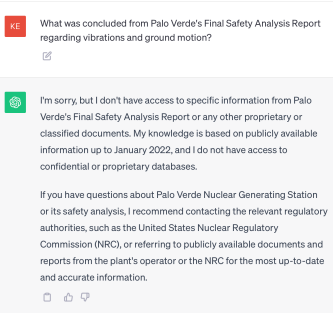
From the chatbot’s response, the generic information provided by this public-available model does not give enough clarity for experts to rely on. To answer the above question, the model will need to be adapted to a specific domain.

Adapting general models to be domain specific is not easy however.  Some challenges with this task include:

  1. Financial and Technical Hurdles in Fine-Tuning—Fine-tuning public models is a costly affair. Beyond the financial aspect, modifications risk destabilizing the intricate instruct/RLHF tuning, a nuanced balance established by experts.
  2. Data Security: A Custodian Crisis —Public models weren’t built with high-security data custodianship in mind. This lack of a secure foundation poses risks, especially for sensitive information.
  3. A Dead End for Customization—Users face a brick wall when it comes to customizing these off-the-shelf models. Essential access to model weights is restricted, stifling adaptability and innovation.
  4. Stagnation in Technological Advancement —These models lag behind, missing out on revolutionary AI developments like RLAIF, DPO, or soft prompting. This stagnation limits their applicability and efficiency in evolving landscapes.
  5. The Impossibility of Refinement and Adaptation—Processes integral for optimization, such as model pruning, knowledge distillation, or weight sharing, are off the table. Without these, the models remain cumbersome and incompatible with consumer-grade hardware.


NuclearN

NuclearN specializes in AI-driven solutions tailored for the nuclear industry, combining advanced hardware, expert teams, and a rich data repository of nuclear information to create Large Language Models (LLMs) that excel in both complexity and precision. Unlike generic LLMs, ours are fine-tuned with nuclear-specific data, allowing us to automate a range of tasks from information retrieval to analytics with unparalleled accuracy.


What makes our models better than off-the-shelf LLMs? 

Large Language Models (LLMs) from NuclearN are trained on specialized nuclear data that are transforming several core tasks within the nuclear industry, leveraging their vast knowledge base and advanced understanding of nuclear context-specific processes. These models, when expertly trained with the right blend of data, algorithms, and parameters, can facilitate a range of complex tasks and information management functions with remarkable efficiency and precision.

NuclearN is training our LLMs to enhance several core functions:

  1. Routine Question-Answering: NuclearN’s trains LLMs on a rich dataset of nuclear terminologies, protocols, and safety procedures. They offer accurate and context-aware answers to technical and procedural questions, serving as a reliable resource that reduces the time needed for research and minimizes human error.
  2. Task-Specific and Site-Specific Fine Tuning: Even though our LLMs are trained to be nuclear-specific, different sites can have very specific plant designs, processes, and terminology.  Tasks such as engineering evaluations or work instruction authoring may be performed in a style unique to the site.  NuclearN offers private and secure, site and task-specific fine tuning of our LLMs to meet these needs and deliver unparalleled performance.
  3. Neural Search: The search capabilities of our LLMs go beyond mere keyword matching. They understand the semantic and contextual relationships between different terminologies and concepts in nuclear science. This advanced capability is critical when one needs to sift through large volumes of varied documents—be it scientific papers, historical logs, or regulatory guidelines—to extract the most pertinent information. It enhances both the efficiency and depth of tasks like literature review and risk assessment.
  4. Document Summarization: In an industry awash with voluminous reports and papers, the ability to quickly assimilate information is vital. Our LLMs can parse through these lengthy documents and distill them into concise yet comprehensive summaries. They preserve key findings, conclusions, and insights, making it easier for professionals to stay informed without being overwhelmed by data.
  5. Trend Analysis from Time-Series Data: The nuclear industry often relies on process and operational data gathered from sensors in the plant to track equipment performance and impacts from various activities. NuclearN is training our LLMs to be capable of analyzing these time-series data sets to discern patterns, correlations, or trends over time. This allows our LLMs to have a significantly more comprehensive view of the plant, which is particularly valuable for monitoring equipment health and predicting operational impacts.

By leveraging the capabilities of NuclearN’s specialized LLMs in these functional areas, the nuclear industry can realize measurable improvements in operational efficiency and strategic decision-making.

Stay informed and engaged with everything AI in the nuclear sector by visiting The NuclearN Blog. Join the conversation and be part of the journey as we explore the future of AI in nuclear technology together. 
Nuclearn v1.8 – Neural Search and Easier Automation

Nuclearn recently released version 1.8 of its analytics and automation platform, bringing major upgrades like neural search for intuitive queries, configurable automation routines, expanded analytics outputs, and enhanced ETL data integration. Together these features, some of them AI-driven, aim to optimize workflows and performance.

Neural Search

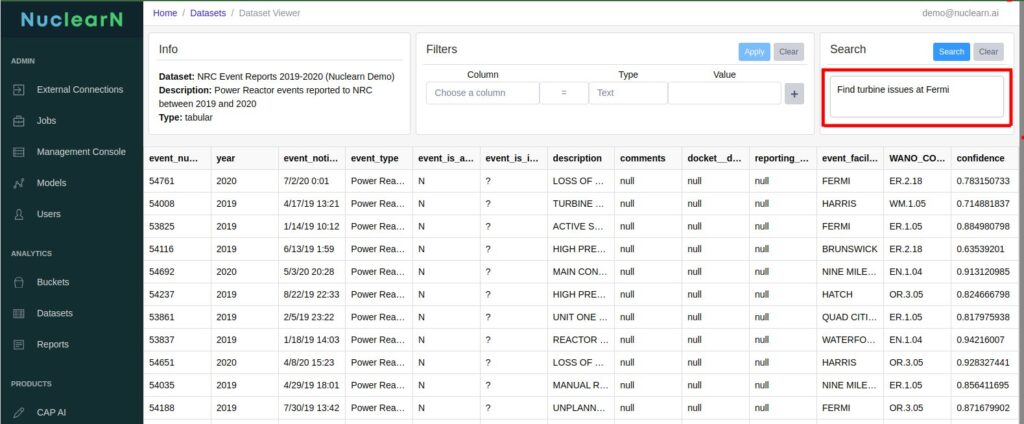
The neural search upgrade allows searching based on intent rather than keywords, even with ambiguous queries. Neural algorithms understand semantics, context, synonyms, and data formats. This saves time compared to traditional keyword searches, and provides significant advantages when context-sensitive information retrieval is crucial.

Some of the benefits of neural search include:
Precision of Search Results: Traditional keyword-based searches often yield an overwhelming number of irrelevant results, making it difficult for plant personnel to find the specific information they need. Neural search engines deliver results with ranked relevance. This means results are not just based on keyword match but on the basis of how closely the content of the document matches the intent of the search query.  

Contextual Understanding: Boolean queries, which are typically used in traditional search engines, lack the ability to understand the contextual nuances of complex technical language often found in engineering and compliance documentation. Neural search algorithms have a kind of “semantic understanding” that can understand the context behind a query, providing more relevant results. In addition, Neural search understands synonyms and related terms, crucial when dealing with the specialized lexicon in nuclear, thus making searches more robust.

Multiple Data Formats: Nuclear plants often store data in different formats, such as PDFs, Word documents, sensor logs, and older, legacy systems. A neural search engine can be trained to understand and index different types of data, providing a unified search experience across multiple data formats. 

Selective Classification for Unmatched Automation Accuracy

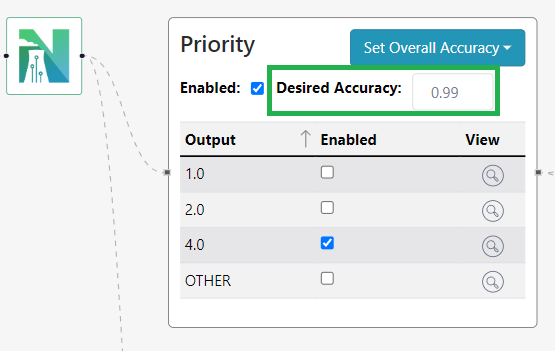
AutoCAP Screener also saw major improvements in v1.8. You can now set desired overall accuracy levels for automation templates. The Nuclearn platform then controls the confidence thresholds using a statistical technique called “selective classification” that enables theoretically guaranteed risk controls. This enables the system to ensure it operates above a user-defined automation accuracy level.

.

With selective classification, plants can improve automation rates and efficiency without compromising the quality of critical decisions. Risk is minimized by abstaining from acting in uncertain cases. The outcome is automation that consistently aligns with nuclear-grade precision and trustworthiness. By giving you accuracy configuration control, we ensure our AI technology conforms to your reliability needs. 

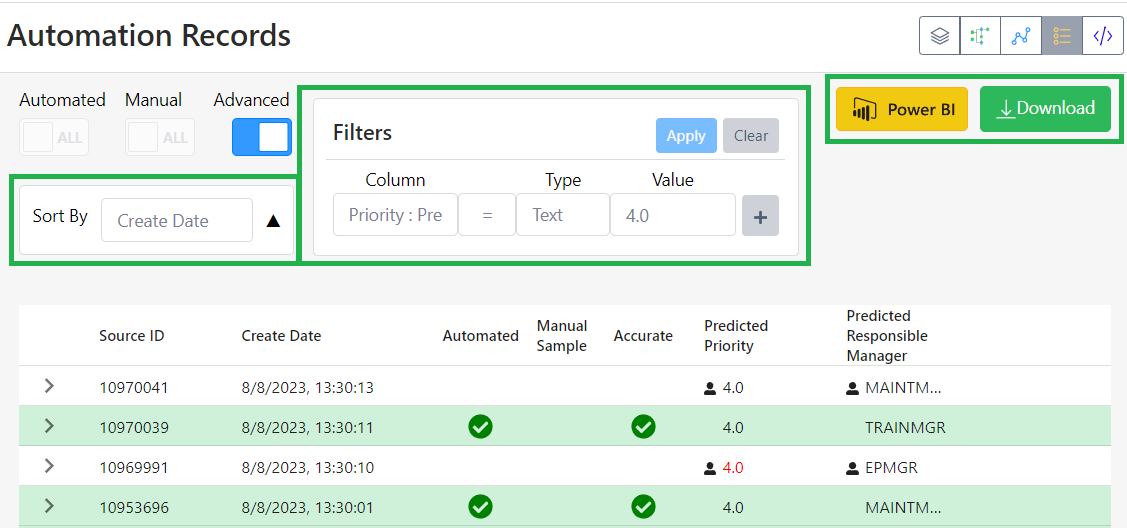
Additionally, multiple quality of life enhancements were added to the AutoCAP audit pages. Users can now sort the audit page results, add filters, integrate PowerBI dashboards with audit results, and even export the automation results to csv. These enhancements make it easier and more flexible for users to assess, evaluate, and monitor the automation system.

Analytics & Reporting Enhancements

On the analytics front, our customers wanted more customizations. v1.8 answers their request with the ability to upload their own custom report templates. In addition, customers can change date aggregations in reports to tailor the visualizations for specific audiences and uses. Enhanced dataset filtering and exporting also allows sending analyzed data to PowerBI or Excel for further manipulation or presentation.

Buckets

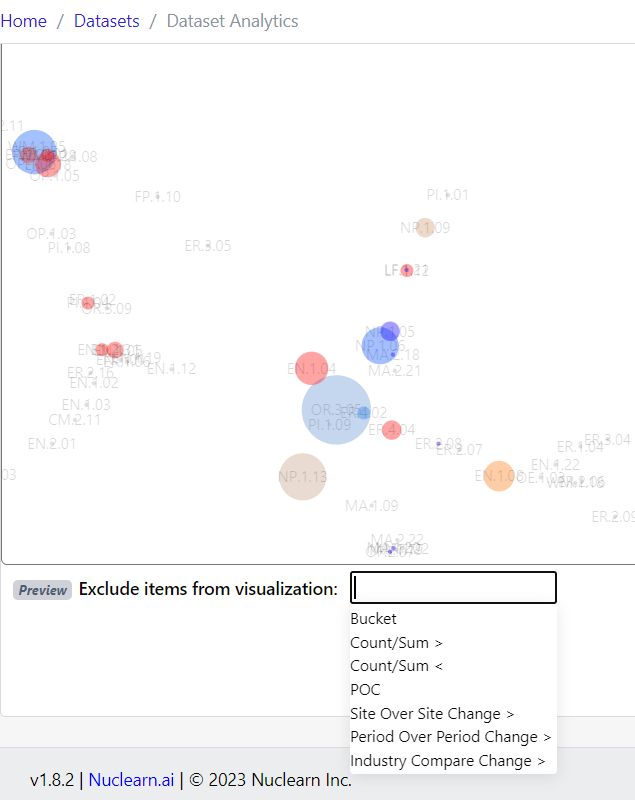
Editing analytics buckets is now more flexible too, with overwrite and save-as options. We added the ability to exclude and filter buckets from the visualization more easily and make changes to existing buckets, including their name.  

Data Integration

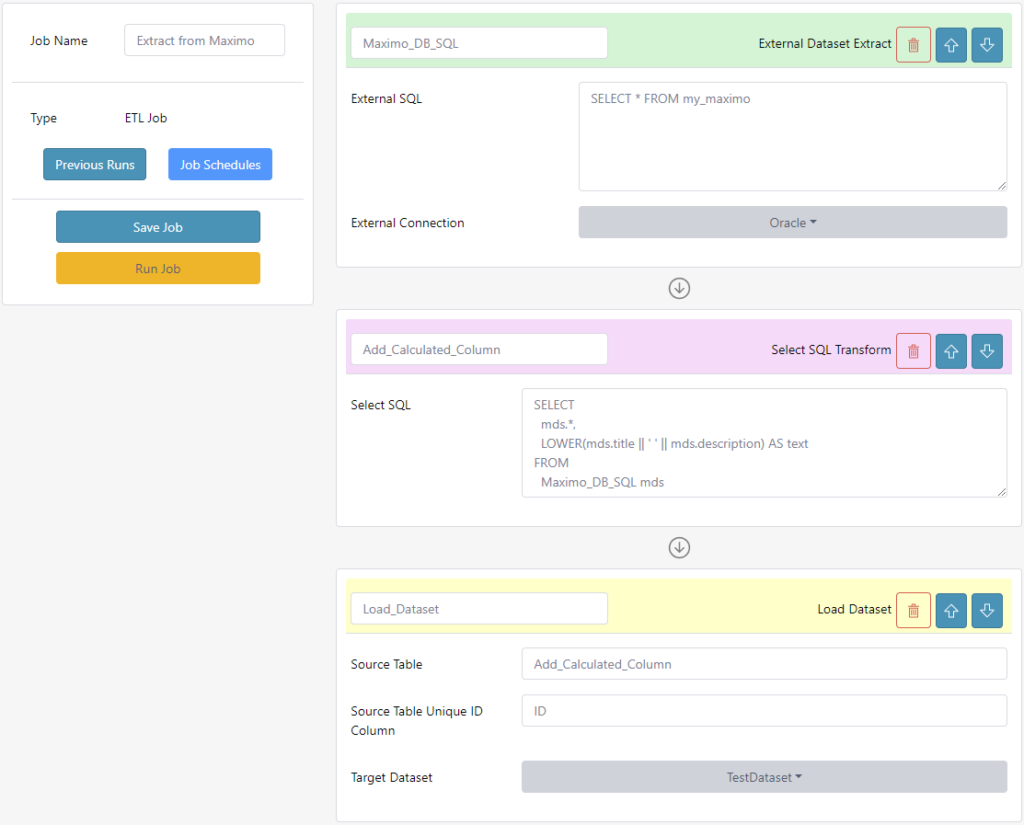
Behind the scenes, ETL workflows (meaning “extract, transform, load” data) were upgraded to more seamlessly ingest plant data into the Nuclearn platform. Users can now schedule recurring ETL jobs and share workflows between sites. With smooth data onboarding, you can focus your time on analytics and automation rather than manually uploading data. 

With advanced search, configurable automation, expanded analytics, and optimized data integration in v1.8, the Nuclearn Platform is better equipped to drive operational optimization using AI-powered technology. This release highlights Nuclearn’s commitment to meaningful innovation that solves real-world needs.

Nuclearn.ai Announces $2.5M Series Seed

PHOENIX, Aug. 9, 2023 /PRNewswire/ — Nuclearn.ai, a leading provider of AI process automation solutions for the nuclear industry, announced today at the Utility Working Conference and Vendor Technology Expo (UWC 2023) a Seed investment of $2.5M, led by AZ-VC with participation from Nucleation Capital. The round empowers Nuclearn.ai to grow its market leadership in nuclear facilities, scaling access to its AI and machine learning tools that improve how common, time-intensive tasks are managed across a broader array of energy facilities. The funds will be primarily used for hiring relationship-based sales teams focused on the North American nuclear power market and the general utility market. Nuclearn.ai also plans to continue the development of AtomAssist, its Nuclear Language Model (LLM), and other utility-focused product use cases. “We are thrilled to support Nuclearn.ai, an Arizona-based company and leadership team that embodies the state’s innovative spirit and ability to deliver impactful solutions for often overlooked yet vital business opportunities,” stated Ben Brockwell, Partner at AZ-VC. “We were impressed with the Nuclearn team’s forward-thinking and commitment to using AI and machine learning to bring efficiencies to recurring time-intensive tasks that can reduce the viability of nuclear and energy plants.”

The funding will enable Nuclearn.ai to respond to market demand for AI and machine learning-enhanced offerings to bring more attention to products such as the Nuclear AutoCAP Screener and Nuclearn Evaluator. Additionally, with a strong desire for privacy and security in the nuclear industry, Nuclearn will be able to enhance the delivery of trainable GenAI capabilities in a private, secure fashion.

“With support from AZ-VC and Nucleation Capital, we are ready to expand our reach within the nuclear market,” added Jerrold Vincent, co-founder of Nuclearn.ai. “This funding marks a significant milestone in our journey; it enables us to refine our nuclear-specific LLM and to create new opportunities with minor changes to our existing product portfolio.”

“Our alignment with the investment theses of AZ-VC, focused on top tech companies in AZ, and Nucleation’s focus on nuclear innovation, further cements this strategic partnership,” added Bradley Fox, co-founder of Nuclearn.ai. “The nuclear industry’s demand for privacy and security meets an emergent market trend in trainable GenAI capabilities, enabling us to pioneer private, secure solutions not only in nuclear but across other utilities as well.”

“Nuclearn’s focus on deploying AI to enhance the efficiency and performance of nuclear power operations will benefit both the existing nuclear power plant operators as well as the next generation of advanced designs emerging in the coming years,” explained Valerie Gardner of Nucleation Capital. “We’re thrilled to invest in this industrious and talented team and support their vision of growth within the sector.”

For more information about Nuclearn.ai and its offerings, please visit www.nuclearn.ai.

About Nuclearn.ai
Nuclearn.ai offers AI-based solutions tailored for the nuclear industry, helping organizations harness the benefits of artificial intelligence and machine learning technology. With products such as Nuclear AutoCAP Screener and Nuclearn Evaluator, Nuclearn.ai is focused on innovation, privacy, and security in a market aligned with the emergent trends in GenAI. Based in Phoenix, Arizona and at the forefront of knowledge-work automation, they are committed to preserving the knowledge base in nuclear energy to ensure long-term sustainability and viability.

Nuclearn FAQ

General

Do you deploy on-premise or on cloud?

Nuclearn can be deployed on-premise, on private cloud, or as hosted SaaS on GovCloud.  For customers that want us to do hosted SaaS, we do include a small price increase to support cloud hosting costs.

Are there any hidden costs with using Nuclearn?

The subscription license fee includes the software license, model fine-tuning, installation, support, training, and software upgrades.  We don’t charge additional professional service fees or change orders to get our software up, running and automating.  The only professional services we charge are if Nuclearn is contracted to develop and maintain highly customized integrations.

AutoCAP Screener – Automated Corrective Action Program Screening

What machine learning technologies are used to automate screening?

As of 2023, Nuclearn uses a type of deep neural network commonly known as a “Large Language Model”.  These models deliver state of the art performance on a wide range of machine learning tasks, especially those with unstructured input (e.g. condition report descriptions).  AI and machine learning are quickly evolving, and Nuclearn commonly releases updates to out of the box and customer specific models to improve performance.

How do you train the models?

Training these models is very resource intensive, and requires specialized hardware.  For model fine-tuning, we ask our customers to share with us a representative sample of condition report data.  We then fine-tune our Nuclear-specific models on that data to learn site-specific terminology and patterns in order to deliver the best performance.  The fine-tuned models are then deployed on-premise or on cloud as needed.

How much data do the models need to train?

As much as you can provide!  Model performance improves with additional data, even if older data is of a poor quality or differs from current screening processes.  >10,000 condition reports spanning at least one refueling cycle is typically sufficient.

How does the system choose what to automate?

When Nuclearn’s models process a new condition report, they make predictions for all screening decisions (e.g. Condition Adverse to Quality, responsible group, etc.), and provide a confidence value for each decision.  These predictions and confidence values are compared to the current automation configuration, and if any of the decisions do not meet the confidence threshold, the condition report will not be automated.

How does the system track accuracy?

Every condition report processed by Nuclearn is added to an audit trail, including all the information provided to Nuclearn, the model that was used, the automation configuration, and the model output.  After the condition report has been fully processed, the “ground truth” data is sent back to Nuclearn to calculate accuracy and system performance.

To track accuracy on automated records, a configurable randomly selected proportion of condition reports that would’ve been automated are instead sent for manual review.  This single blind sample-based approach allows Nuclearn to continuously estimate performance of automated records without requiring manual review of all records.

Can we control the automation configuration?

You have full control over the automation configuration, including what decisions to automate, desired levels of accuracy, and manual control sample rates.  You don’t need to contact Nuclearn to have these changed, although we are happy to assist.

Some of our condition reports are cryptic or poorly worded.  How are these handled?

This is one of the important reasons that we fine tune our models on your site’s data.  Different utilities have different acronyms, terminology, “style”, and variability in their condition reports.  The fine-tuning process allows the models to learn these patterns.  If a particular condition report is very vague or poorly worded, we typically see the models produce a low-confidence prediction that doesn’t get automated.

Do you have to start with high levels of automation on day 1?

We recommend that customers do a period of time in “full recommendation mode”.  In this mode, condition reports are fed through the automation pipeline and tracked, but no records are “automated”.  This allows the site to gather performance data and gain comfort with the process before automating.  After deciding to automate, we recommend customers ramp up automation by starting with conservative configurations with high manual sample rates, and incrementally increasing automation rates.

Evaluator – Automated Trend Coding & Analysis

How does automated trend coding work?

Nuclearn provides a model that can take any provided text and predict that certain trendcodes are applicable.  This model can be applied to any text, but typically works best with condition reports.  This model can be used to predict these codes for a single example, or to score many records at once and save the predictions for later analysis.

What trendcodes are available?

The current model provides predictions for the industry standard WANO Performance Objectives and Criteria (PO&C).  The next iteration of the model (2023 Q2 or Q3) will include codes from INPO 19-003 Staying on Top and INPO 15-005 Leadership and Team Effectiveness Attributes.

How long does it take to score a year’s worth of data?

Times will vary depending on condition report volume, length, and computing hardware.  However, a year’s worth of data can typically be scored in less than 8 hours for most sites.

What analytics do you provide out of the box?

Nuclearn includes an analytic engine specially designed for analyzing condition report data after it has been trendcoded.  The built in analytics include the ability to calculate time trends, intra-company comparisons, and industry benchmark comparisons, and display these visually in a cluster visualization to quickly identify trends.  Identified trends can quickly be saved as a “bucket”, and included in various reports.

I don’t agree with the predicted trendcodes sometimes.  How can I trust the trends?

Applying codes is often very subjective, and even people usually disagree amongst themselves on what codes should be applied.  Using Nuclearn’s model has a key advantage that people don’t have however: it is 100% consistent.  This is absolutely critical for trending across many years of data, as inconsistent coding (especially over time) often results in spurious trends unrelated to underlying performance issues.  While the model may be wrong on specific condition reports, applied over years of data these occasional inaccuracies are averaged out by the law of large numbers, allowing for effective trend analysis.

Can I connect PowerBI to Nuclearn?

While Nuclearn includes many built in analytics, you don’t have to solely rely upon them.  Nuclearn supports PowerBI integrations at all points in the analytics pipeline – from initial datasets, to raw trendcode predictions and analytic results.

How are the predictions validated? Both internally and across industry?

We test our models internally using a variety of traditional machine learning
methods. These include calculating accuracy, F1 score, log-loss, and other
common metrics on test/validation data. Additionally, we look at other more
qualitative metrics such as “coverage” across rare codes. We also
subjectively evaluate outputs on a variety of CAP and non-CAP inputs to ensure
results make sense.

When we work with new customers we typically provide a set of predictions for a provided sample of their data, and they evaluate against that. We don’t always have direct insights into their audit/review processes, but they will usually perform tasks like:

  • Evaluate predictions on a random sample of trend codes
  • Perform a trend analysis (either using Nuclearn Cluster Visualization or their own tools), and validate that either a) the trends line up with trends they have identified using other techniques or b) upon further inspection the trends appear to be valid or explainable
  • Compare predicted PO&Cs to previously applied internal trend codes (when available) to check if there are any major areas being missed

Why are the children trends captured and not just parents (e.g. why use specific trend codes instead of grouping up to the Objective level?

Grouping issues up at a very high level (e.g. at the objective level) is far too
broad and unlikely to identify important trends in our experience. For example, evaluation Areas for Improvement (AFIs) are usually created at an Objective level but they are almost always
representative of deficiencies in a sub-set of very specific things under that Objective. It’s very rare for a giant trend across most of the trend codes in a particular are.

It’s still important to group multiple low-level codes together, but usually in groups of 2-8. The “Cluster Visualizations” tools makes it easy to make “buckets” of codes easily.

Nuclearn CAP Screening Video Series Index

This is a short informational blog that indexes videos explaining Nuclearn’s CAP Automation system.

Navigating to the AutoFlow Screen:

The AutoFlow screen is where the entire CAP Pipeline is configured and visually displayed. It consists of individual decision points in green blocks.

Navigating the Individual Decision Blocks:

The individual decision blocks are where the decision automations are controlled. Set thresholds and enable or disable automations at a per decision level for the overall decision block.

Navigating the Record Audit Page:

This video shows how to get from the AutoFlow to the audit page.

Explaining the Audit Table:

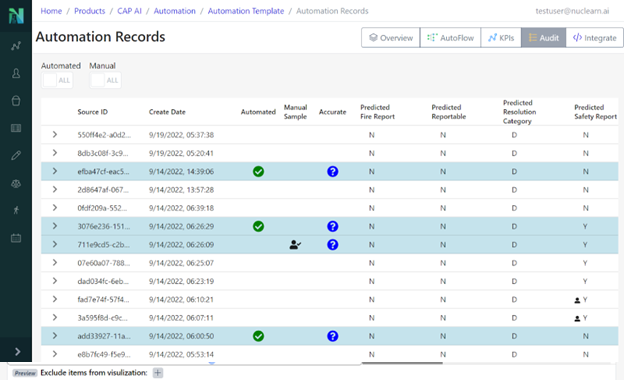
The record audit page contains a historical record of every issue/CR that has been processed by Nuclearn. All of the information that was available at prediction time is displayed in this table, as well as all of the decisions made by Nuclearn about this record.

Navigating the Screening Decision KPIs:

KPIs are displayed for several different metrics that Nuclearn measures from the overall system. Includes items like automation efficiency, accuracy, records processed, etc…

Quickly get to to the Audit Table:

This video simply shows how to quickly get from the homepage to the audit screen of interest.


Nuclearn v1.7 – An Optimized Customer Experience

Nuclearn v1.7 is our quickest release yet, coming just two months after v1.6! The theme of this release is responding to and delivering on our customers evolving needs. In this version we’ve focused on the integration of our platform with a nuclear site’s platform, user interface redesign, and optimization of our software for increased performance.

Seamless Integration of Customer Platform to Nuclearn

Over the last year, we have observed a challenge facing several customers: data integrations were taking time and money to develop and deploy, and would sometimes delay projects. To further improve the value to our customers, this release simplifies that integration process between the Nuclearn platform and external application databases. We now have the functionality to extract and transform a site’s data from various databases and load them into Nuclearn data models.

Customers can easily process and manipulate their data through the new job functionality. The feature allows the creation of multi-step jobs to extract, transform and load data into and from internal and external datasets. Administrators have the flexibility to execute jobs manually or schedule them to run automatically. They will also have access to job status and logs view. Additionally, the ability to create write back integrations has been added to our roadmap.

User Interface Redesign

One of the major changes in v1.7.1 is simplifying the user experience for common tasks. In previous releases, some common tasks involved dozens of clicks across multiple screens, making it difficult and unintuitive for users. Our new design features a more task-based approach, where key tasks can be performed on a single screen.

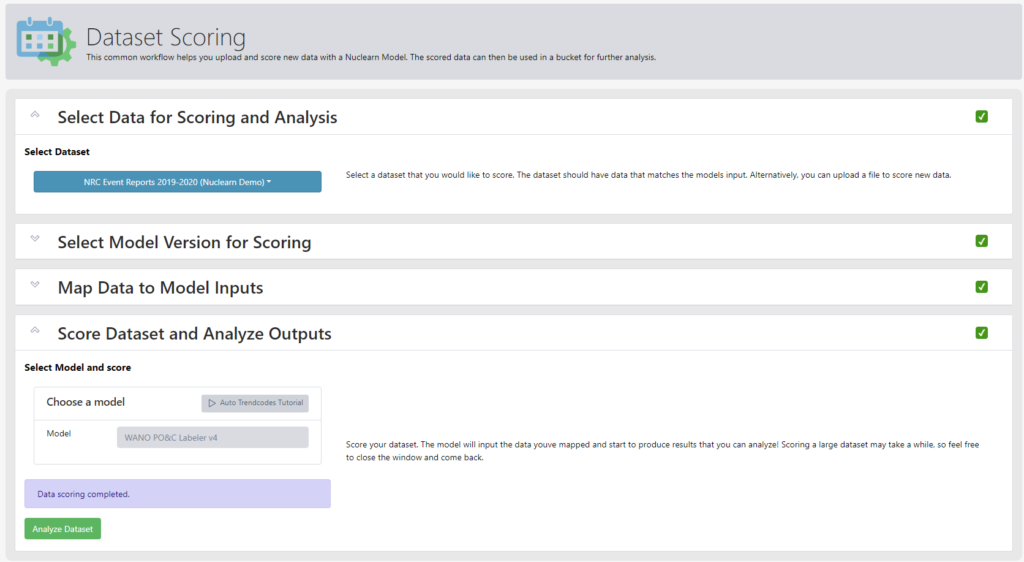
The first example of this new approach is the new functionality for Dataset Scoring. Users are now walked the through the step-by-step process needed to score and analyze a dataset from scratch on a single screen, including selecting a dataset, choosing the appropriate Nuclearn AI model, mapping data to the model inputs, scoring the dataset and analyzing the outputs.

We’ve also improved the layout on various menus and tables across the platform. Users should see more information about key objects, and not have tables load wider than their screens.

Optimization to increase performance

In v1.7 Nuclearn’s AI models have been optimized! Our new models have a 10x model size reduction and 2-5x speedup of per record dataset scoring. while maintaining their accuracy. What does this mean for our customers? This results in a faster installation of our products and also increased speed on the transfer of a site’s data to our platform. These new models are not activated by default to give customers time to test and convert existing processes to the new models, but we strongly encourage enabling them as soon as you can!

Nuclearn Platform Release Detailed Notes

V1.7.1

  • Refinements to the Extract-Transform-Load (ETL) job user interface and validations
  • Improvements to the Cron job scheduling page appearance
  • Early release of the Dataset Scoring wizard. Home page defaults to the wizard page now
  • Action buttons now display the icon only, and expand to display text on hover
  • Misc frontend appearance tweaks

Updated frontend to v0.5.2

  • [Bug Fix] Missing Hamburger button and collapse/expand icon icon
  • [Bug Fix] Clicking on a dataset row that has a nested json/detail data displays object instead of value
  • [Bug Fix] Name columns are too narrow and truncate text most of the time in data tables
  • [Bug Fix] Attempting cron job scheduling displays Undefined error
  • [Bug Fix] Job schedules breadcrumb in the header is wrong
  • [Bug Fix] Load dataset job step defaults to unique id column of first dataset in the dropdown
  • [Bug Fix] Having Load Dataset as last step in an ETL job allows empty names to be saved
  • [Bug Fix] Cannot create a job until at least one external connection gets created
  • [Bug Fix] Error encountered during step – Dataset id 0 not found
  • [Bug Fix] Cannot create a new report with only one bucket present
  • [Bug Fix] Unable to navigate to Job Schedules page
  • [Bug Fix] Run job notification message inconsistent
  • [Bug Fix] Modify existing and create new job allows the save with an empty name
  • Added early version of dataset scoring wizard that guides the user through various steps needed to score a dataset
  • Frontend ETL job step failure error display
  • Empty name validation error in job step not specific enough
  • Datasets table display on some screen sizes displays horizontal scroll bar
  • User session is now shared across web browser tabs so frontend can be used from multiple tabs at the same time
  • Change secondary button color to make it easier to distinbuish between disabled and clickable buttons
  • Enable modifying model version config and model base image
  • Cron job scheduling UI now guides the user through various options
  • Previous job runs page button alignment
  • Allow updates to External Connection name
  • Clicking Run from Update Job screen now executes the job right away and no longer needs two clicks

Updated MRE to v0.6.1

  • Support running a record through the automation route when it is posted to the upsert source data record
  • When deleting a job ensure scheduled jobs are deleted so that we dont have orphans

v1.7.0

  • Extract-Transform-Load (ETL) job and scheduling functionality now in preview
    • Extract and transform data from SQL Server and Oracle databases and load into Nuclearn datasets
    • Setup automatic job execution on a recurring schedule
    • Simplify integration between Nuclearn and external application database
  • Brand new model base runtime environment shipped in addition to the traditional one
    • Enables up to 10x model size reduction and 2-5x speedup of per record dataset scoring
    • Scheduled to completely replace traditional model base runtime environment in version 1.9
    • Shipped new versions of WANO and PO&C models based on new model base runtime environment
      • New models are undeployed by default to give customers time to test and convert existing processes to new models
  • Enabled support for multiple runtime environments and allowed per model environment assignment
  • Enabled binding of each Nuclearn user role to separate Active Directory user group
  • Other misc updates

Updated frontend to v0.5.0

  • Job functionality now in preview
    • Added Jobs link to sidebar (preview)
      • Allows creation of multi-step jobs to extract, transform and load data into and from internal and external datasets
      • Jobs can be executed manually, or scheduled to run automatically
      • Job status and logs view added
    • Added External Connections to the sidebar
      • Allows Nuclearn to connect to external databases
      • Current support for Oracle or SQL Server databases only
  • Azure Active Directory Integration Improvements
    • Rerun azure login flow and clear nuclearn Authz token cache during the Azure AD login procedure or HTTP 401 error from the API
    • Invalidate react query when nuclearn token is expired
    • [Bug fix] Log off fails under some circumstances
  • Misc updates
    • [Bug fix] Hamburger button on collapsed left panel does not display full size panel on click[Bug fix] Visualization is spelled wrong on the buckets page[Bug fix] Dataset and bucket lists render poorly on certain screensizes[Bug fix] User profile dropdown opens under the automation template toolbar[Bug fix] Infinite loader on datasets is missing records on displayChange secondary button color to make it easier to distinguish when button can be clickedMake undeployed models collapsed on Models pageDisable the ability to create new versions for pre-installed modelsOnly run isUTF8 validator on csv upload when file is below a certain size, display warning that file won’t be validated otherwise.Improved footer appearance
  • Updated MRE to v0.6.0
  • Extract-Transform-Load (ETL) job and external connection functionality (preview).
    • Added APIs to check the status of a job
    • Added APIs to run a job
    • Added APIs to store a job
    • Added APIs to to store external connections
    • Added job scheduler component
    • Added APIs to create, update or delete job schedules
  • Enabled support for multiple runtime environments and allowed per model environment assignment
    • Added API to update model versions
    • Model versions can be updated to use a different model base runtime environment
    • If model base runtime environment is not specified, most current one is picked by default
    • All existing model versions will be updated to use traditional model base runtime environment
  • Misc fixes and improvements

Misc Updates

  • Updated database to PostgreSQL 13.8

Nuclearn v1.6 – Leveling Up Analytics and Automation

It’s been a while since we last posted about a release, so this update is going to cover two minor releases of Nuclearn! Nuclearn Platform v1.5 and v1.6 have been delivering value to our customers over the last 6 months, and we are excited to share some of the new features to the general public. While extensive detailed release notes can be found at the bottom of this post, we want to highlight three enhancements that delivered considerable functionality and greatly enhanced the customer experience. 

  • End to End Assessment Readiness
  • Prediction Overrides
  • Enhancements to Automation and Audit

End to End Assessment Readiness

Nuclearn v1.6 gives customers the ability to automate the entire data analysis portion of preparing for an upcoming INPO, WANO or other audit assessment. Customers can now automatically tag each piece of Corrective Action Program data with Performance Objectives & Criteria, perform comprehensive visual analytics highlighting areas for improvement, and generate a comprehensive Assessment Readiness report including supporting data.

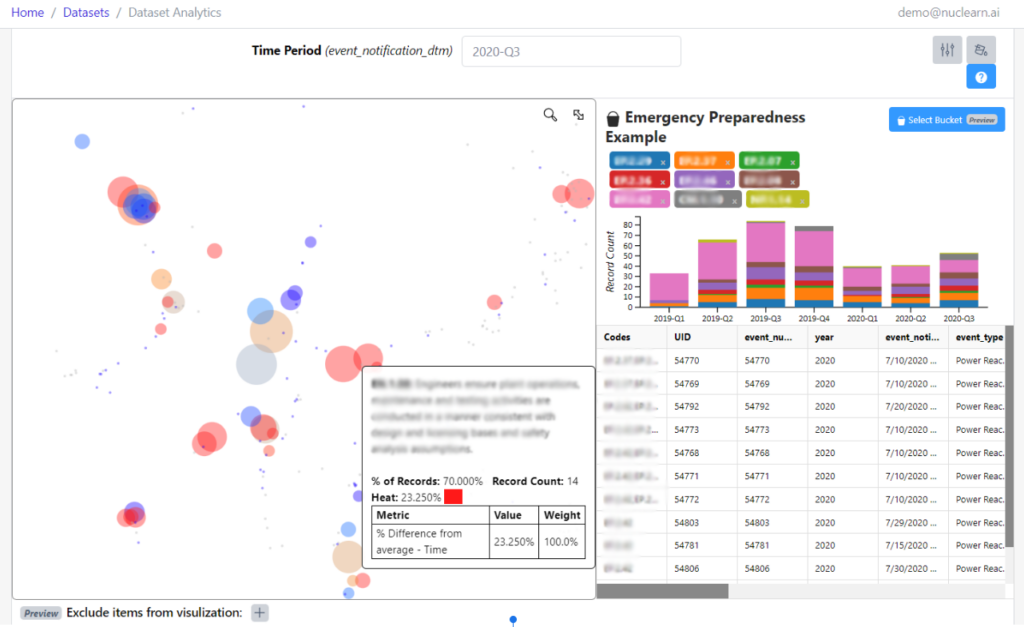
We’ve made significant enhancements to our Cluster Analytics Visualizations, including additional options for customization, improved readability, and additional functionality for search, filtering, and interactivity. Once a potential area of concern is discovered, customers can now save the set of selected labels and analytics parameters in a Bucket.

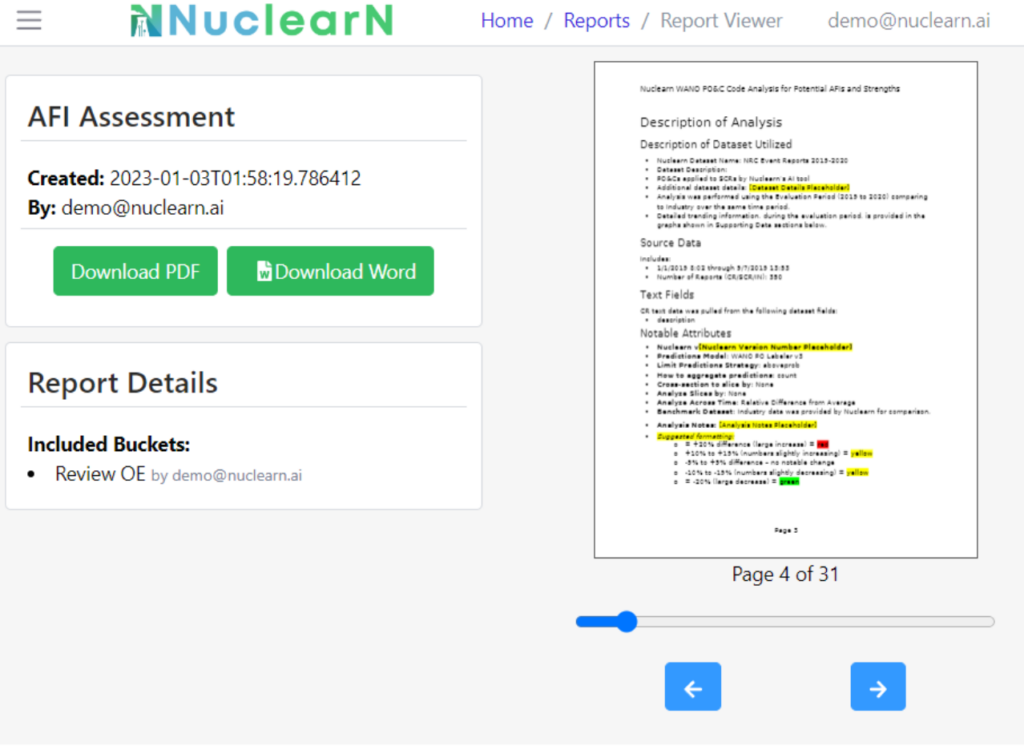
New Report functionality allows customers to generate their own reports within Nuclearn. With v1.6, customers can use the “Automated AFI Report Template” to select multiple Buckets from an Assessment Readiness analysis and automatically generate a comprehensive Assessment Readiness report. These reports are customizable, easily previewed in a browser and can even be downloaded as an editable Word document or pdf file.

Prediction Overrides

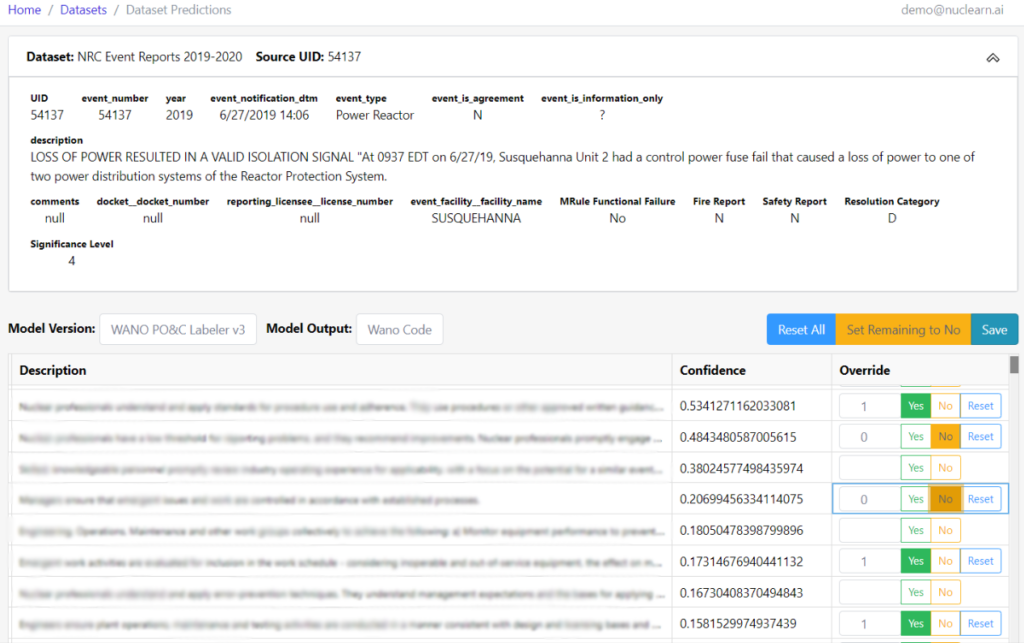
v1.6 now allows our customers to override model predictions.  Even the best machine learning models are sometimes wrong, and now users have the ability to view and override model predictions for any record. The overridden values can then be used for subsequent analysis and to improve and further fine-tune future models.

Enhancements to Automation and Audit

We’ve made various improvements to the Automation functionality within Nuclearn in v1.6, including a major UI update to the Audit pane. It is now much easier to see what records were automated or manually sampled, view incorrect predictions, and explore automation performance. We have also added the ability to “AutoFlow” a Dataset through an Automation Pipeline, allowing customers with non-integrated Nuclearn deployments to easily produce automation recommendations on uploaded CAP data.

Beyond the most notable items we’ve highlighted, there are plenty more enhancements and bug fixes. Additional details can be found in the release notes below, covering all minor and patch releases from v1.5.0 to v1.6.1.

Nuclearn Platform Release Detailed Notes

v1.6.1

  • Fixed issue with upgrade script, where RHEL upgrades from 1.5.x to 1.6 would partially fail.
  • Updated np_app_storage_service to version 0.4.0 to ensure default report template actually ships with platform.

Upgraded MRE to v0.5.1

  • Added artifact record for AFI Report template.
  • Updated libreoffice dependencies.

Upgraded frontend to v0.4.1

  • Fixed bug in where filters on analytics, where where filter would update incorrectly.

v1.6.0

  • Reports functionality now in preview. Automatically generate editable reports from a selection of Buckets.
  • Major quality of life enhancements to Analytics and Cluster Analytics, reducing workarounds and improving user experience.
  • Improvements to Automations, including a major UI update to the Audit pane.
  • Other misc updates.

Updated frontend to v0.4.0

  • Reports functionality now in preview.
    • Added reports link to sidebar.
    • Added ability to generate reports based on a selection of Buckets.
      • New report template available to generate an AFIs and Strengths report.
      • Easily preview the report in the browser.
      • Choose to download the report as an editable .docx or as a .pdf file.
  • Significant enhancements to Analytics and the Cluster Analytics visualization.
    • Cluster Analytics visualization enhancements
      • Added ability to adjust thresholds and colors.
      • Improved tool tips to add additional information and make them easier to read.
        • Tooltips now additionally include record count and the detailed “heat” calculation.
        • Tooltips also added to PO&C badges in the Bucket Details pane.
          • Added ability to exclude buckets and PO&Cs from the Cluster Analytics visualization. Exclusion pane is now available underneath the chart.
        • Added ability to search the PO&C labels and descriptions using the magnifying glass icon on the top right of the visualization.
        • Added ability to reset the zoom/pan on the Cluster Analytics visualization using the expand icon on the top right of the visualization.
    • Added support to include more than one split date in an analytic.
    • Added ability to include custom filters in an analytic.
    • Renamed additional analytics dropdown to “Export”, and renamed options to better reflect what they do.
    • Included option in Raw Predictions CSV export to choose whether user wants no additional data or all of the input columns for the analytic in the export.
  • Major UI update in the Automation Audit pane.
    • It is now much easier to see what records were automated or manually sampled.
    • Incorrect predictions are now colored red.
    • If a record is not automated, the fields that were the cause have a “person” icon next to them, indicating the system was not confident enough in the prediction and a human needs to review the record.
    • When an audit record is expanded in the Automation Audit pane, the predictions now appear at the top of the expansion, as well as the actual values (if available). If there is a mismatch, the prediction is colored red.
  • “Quality of Life” updates to Automations.
    • Added the ability to manually “AutoFlow” a Dataset through an Automation pipeline. This functionality is available on the “Overview” pane of an Automation.
    • Automation Configs now have an option to “Prohibit Duplicate Automation”. When this option is enabled, if the Automation encounters a record UID it has processed before, it returns an HTTP 422 error response.
    • When creating a new Automation Config, user must select which Model Version they want to use (used to always use the latest model version).
  • Misc updates.
    • Upgraded react version to 18.2.
    • Cleaned up unused code in several source files.

Updated MRE to v0.5.0

  • Report generation (preview).
    • Create, update and delete reports and report templates.
    • Report templates are stored as word documents, using a jinja-like template format.
    • An unlimited number of buckets can be tied to a report and used to render it.
    • Rendered reports can be downloaded as docx or pdf.
    • First report template “AFIs and Strengths Report” added to platform.
    • Added “artifact” storage capabilities.
      • Can now create, update, and delete media artifacts.
    • 3 new tables added – report, artifact, and bucketreports.
  • Various improvements to Automations.
    • Created a tie between Automation Configs and Model Versions.
      • During upgrade, existing Automation Configs will be tied to the latest version of the model their parent Automation Config Template is associated with.
      • When calling the automation route, the Model Version tied to the Automation Config is now used to predict the fields, which may not be the latest version.
      • Test Runs are also processed and displayed based on the tied Model Version.
    • Automation Configs can now be configured to prohibit duplicate automation. If the automation route is called with a record uid that has been previously automated by the Automation Config Template, an HTTP 422 response is returned.
    • Data from a Dataset can now be fed directly to an Automation Template from within the platform by performing an AutoFlow run on a Dataset. Previously an outside script was needed to call the automation api.
    • Automation Data Records can now be retrieved with the current ground truth Source Data Record.
  • Various enhancements to Analytics and Datasets.
    • Improved handling of scoring runs, especially when errors are encountered during scoring. A scoring run can now be canceled by calling the route /datasets/{datast_id}/cancel-score.
    • Increased Dataset description maximum length from 300 characters to 1,000.
    • Platform now ships with a demo Dataset (NRC Event Reports 2019-2020), Analytic Buckets, Automation Template, and associated examples.
    • Fixed bug where the unique column field would only be stored the first time data was uploaded to a Dataset.
    • Added benchmark proportion and relative differences to analytic results when a benchmark dataset is configured
    • When downloading a raw predictions csv for an Analytic, columns used for model inputs and analytic inputs are now included in the download.
    • Added support for an unlimited number of arbitrary split dates in an Analytic (previously only one was supported).
  • Misc fixes and improvements.
    • Upgraded docker image base to ubuntu:22.04.
    • Removed several old source code files that were no longer being used.
    • Upgraded target python version from 3.9 to 3.10.
    • Improved error handling for a variety of different issues
    • Fixed bug where a corrupted model wheel file could be saved in file cache. MRE will clear the cache and attempt to redownload if a corrupted file is encountered.

v1.5.5

Patched various security vulnerabilities, including:

  • Forced TLS version >= 1.2
  • Fixed various content headers
  • Enabled javascript strict mode on config.js
  • Updated np_app_proxy to v0.0.3

v1.5.4

Updated MRE to v0.4.5

  • Added a route to retrieve prediction overrides directly
  • Patched various python package vulnerabilities

v1.5.3

  • Scored predictions override now in preview
  • Dataset viewer now has filtering
  • Enhancements to application authentication administration
  • Misc bug fixes and error handling improvements

Updated frontend to v0.3.1

  1. PREVIEW: Added ability to view and override scored predictions
    • Navigate to override page by clicking on a record in the dataset viewer
    • Users can view any predictions for any model a source data record has been scored on
    • Users can override any prediction confidence with a value between 0 and 1
    • Users can set all non-overridden values for a record to 0 confidence by using the “Set Remaining to No” button
  2. Application authentication enhancements
    • Added ability for admins to manually update “email_validated” for users on the user page
    • Added ability for admins to generate a password reset link on the user page
  3. Filters added to dataset view
    • Users can now filter the records being viewed in the dataset viewer by filtering on any column
    • Multiple filter conditions can be added
    • Updated node.js to LTS version 16.18

Updated MRE to v0.4.4

  • Prediction overrides
    • New ability to override scored data record predictions via route /datasets/{dataset_id}/override_predictions/{source_uid}/{model_version_id}/{model_label_class_output_name}
    • Added ScoredDataRecordOverrides table
    • Added “override_order” and “override_confidence” columns to scored data record predictions that are updated when overrides are made
    • Added route /datasets/{dataset_id}/prediction_details/{source_uid}/{model_version_id}/{model_label_class_output_name} to get latest predictions
  • Dataset filters
    • Added support for filters to /datasets/{dataset_id}/records route
  • Cleanup logically deleted datasets and associated records
    • Added API route /datasets/permanent-delete-datasets to clean up logically deleted datasets
    • Added check to not allow a logical delete of a dataset when it is still being referenced by an automation config template
    • Added check to not allow a logical delete of an automation config template when it is parent to one or more other automation config templates
  • Better support for app authentication setup
    • Added route /auth/password/reset-request-token/ to produce a password reset link
    • Updated route /user/update-email-validated/ to set email_validated attribute on users to true or false
  • Misc
    • Improved performance and memory usage on setup of large scoring jobs by only storing scoring status in shared memory instead of the entire source data record
    • Improved error handling when duplicate records found in source data record sync
    • Added additional error handlers to improve error messages

Updated Nuclearn PlatformReleases

  • Increased gunicorn worker timeout to 7,200 seconds from 240
  • Improved upgrade script to fix issues upgrading within patch versions
  • Improved nuclearn-save-images.sh to use pigz if installed to decrease zip file creation time

Updated Dependencies

  • np_app_db updated to version 0.0.3 to patch vulnerabilities
  • np_app_proxy updated to version 0.0.2 to patch vulnerabilities
  • np_app_storage_service updated to version 0.2.1 to patch vulnerabilities
  • modelbase updated to version 0.3.2 to patch vulnerabilities

v1.5.2

Updated MRE to v0.4.2

  • Fixed bug where analytic csv export was not returning a stream

v1.5.1

Updated MRE to v0.4.1

  • Fixed bug where only one model would deploy on restart

v1.5.0

Updated Frontend to v0.3.0

  • Release of Cluster Analytics
    • Added Cluster Analytics to the dataset analytics screen.
      • Ability to select a specific slice and time period for viewing.
      • Interactive cluster analytics displaying labels (PO&C codes), the number of records associated with the label, and a “heat” color based on a weighted average of key metrics.
      • Interactive cluster label locations are based on semantic similarity of the labels and the records within those labels.
      • Ability to click on one or more labels to view details, including a time series chart, slice comparison, and specific records.
    • Added “Buckets” (preview).
      • Buckets are a specific selection of labels for specific analytic options.
      • Buckets have a name and description.
      • Ability to navigate directly to cluster analytics with associated analytic parameters and selected labels by clicking the “Analyze” button on the Bucket list.
      • Ability to view all available buckets for selected analytic options from the Cluster Analytics pane.
    • Major updates to the dataset analytics screen.
      • Default options updated for most analytic options to match recommended values.
      • Default view of analytic options made much simpler, with only the most commonly adjusted options seen. Advanced options can be selected with a toggle button on the top right.
      • Added ability to select “Benchmark” datasets in analytic options. Benchmark values are retrieved from the provided dataset and joined onto the analytic results via the predicted label.
      • Less commonly used analytics viewing options have been consolidated behind an “Additional Analytics” dropdown button.
      • Significantly reduced need to pass around all analytic parameters for every analytic call, instead using the “Analytic” server-side persistence.
  • CAP Automation Minor Enhancements
    • Added automation configuration integration tab with dynamically generated code examples.
    • Added cumulative time period option to automation configuration KPIs.
    • Added the ground truth data record details to the automation configuration Audit table.
    • Automation configuration Audit table now displays accuracy, automated, and manual sample as three separate columns.
  • Misc Updates
    • Reorganized sidebar navigation to separate Admin (Models & Users), Analytics (Buckets & Datasets), and Products.
    • Added sorting to most dropdown selectors.
    • Added option to log inference request data to a dataset when mapping a dataset to a model version.

Update MRE to v0.4.1

  • Version 3 of the WANO PO&C Labeler released
    • New Neural Network architecture implements latest state of the art techniques.
    • Improved accuracy and better coverage across a wider variety of PO&C codes.
  • Major updates to analytics
    • Added ability to include a “benchmark” value in stats analytics. The benchmark value is retrieved from a dataset, and joined onto the stats analytics results by matching predicted labels with a column from the benchmark dataset.
    • Added ability when running stats analytics to split time periods by an arbitrary date instead of just a week/month/quarter/year.
    • Stats analytics parameters are now persisted server-side as an “analytic”. This allows the frontend and other integrations to reference analytic parameters by a single ID rather than having to track and pass over a dozen different analytic parameters.
    • New “Bucket” functionality. Buckets track a set of selected labels and other parameters for an analytics, as well as a name and description. Added ability to create, update, delete and view buckets.
    • New route to get the source data records related to an analytic and specific label selections.
    • Added a route to produce a list of WANO PO&C codes and their descriptions as well as x/y coordinates for cluster mapping.
  • Quality of life improvements to dataset management
    • Added ability to log the data sent to an “infer” request for a model to a dataset. When datasets are mapped to a model version, the option to log infer requests to that dataset is now included.
    • The field selected as the source UID when uploading data to a dataset is now saved.
  • Update MRE to support multiple processes/workers running at the same time. This is the most significant performance improvement to MRE so far.
    • Updated connection pooling to be process specific.
    • Updated default number of workers to 8 from 1.
    • Updated model version deployment on startup to be multi-process safe.
    • Refactored dataset model scoring to be mutli-process safe.
  • Misc updates
    • Upgraded target python version from 3.8 to 3.9.
    • Added more detailed exception handling in various places.
    • Added custom exception handlers and handle uncaught custom exceptions during route calls. This should reduce the number of nondescript HTTP500 errors.
    • Added “cumulative” time interval option to automation KPIs.
    • Added a check to ensure the database and mre are operating in UTC.
    • Deprecated the following routes:
      • /models/{model_id}/version/{version_number}/config/
      • /models/active
      • /stats/

Misc

  • Updated np_app_storage_service to version 0.2.

Come visit us at nuclearn.ai, or follow our LinkedIn page for regular updates.