
One AI for
the whole plant.
The latest AI, with Nuclearn's specialist tools for nuclear work. Ask it anything about your plant and get the answer with its sources, or hand it the job: a 50.59 screening, an equivalency evaluation for a replacement part, a reportability check, a first draft in Word.
- Single-tenant, hosted by Nuclearn
- Signs in with your company's SSO
- Answers only from documents you may see
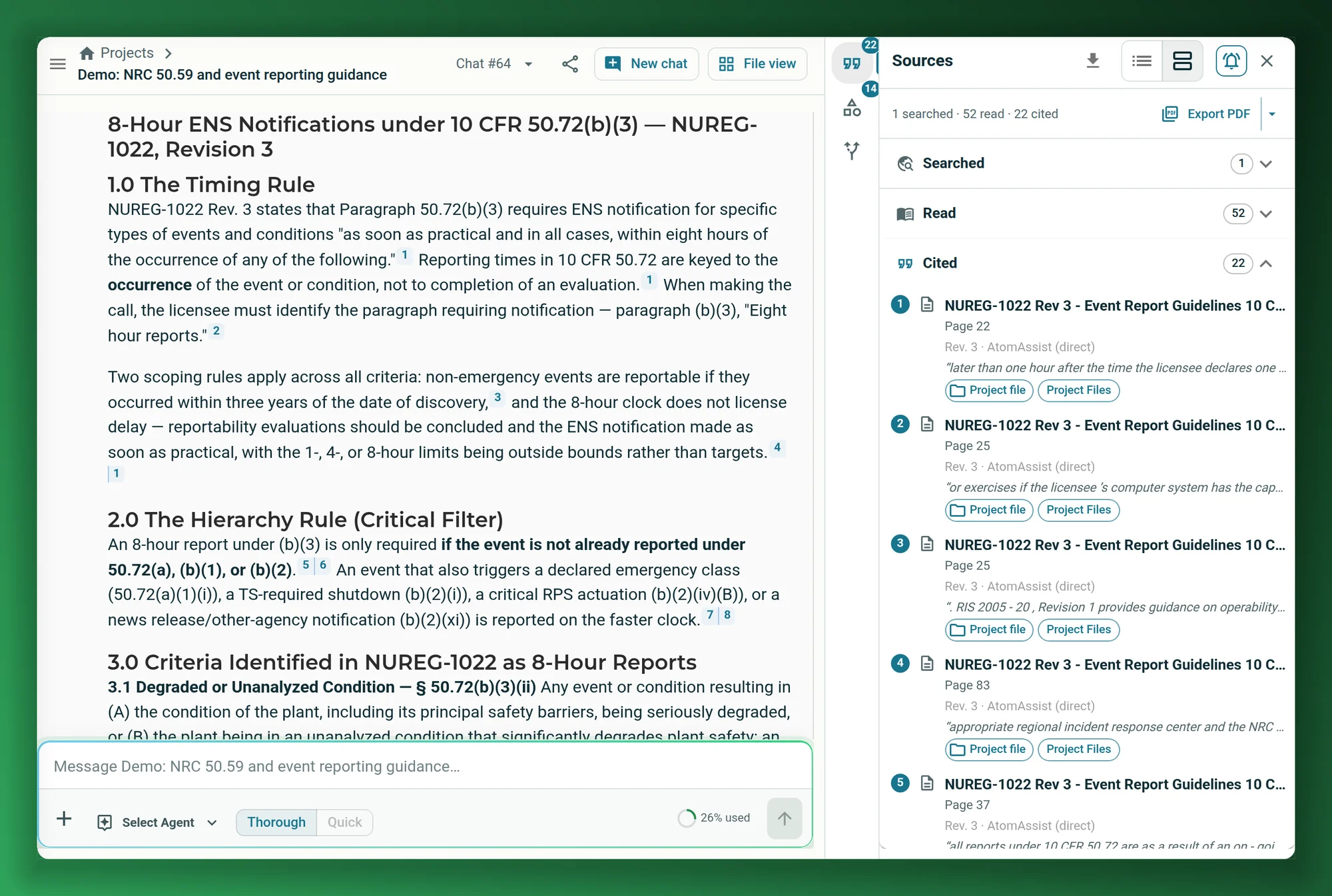
Screenshots on this page show AtomAssist as it is today, working on publicly available NRC documents.
- Backed by NuclearnAI software built for nuclear plants since 2021
- Over 70 facilitiesNuclearn products serve sites in North America
- ISO/IEC 27001:2022Certified information security management
The jobs plants bring to AtomAssist.
Licensing, engineering, CAP, reliability, planning and supply chain work all start the same way: find what the plant already knows, check it, and write it up. AtomAssist does the finding and the first draft, and shows where every answer came from.
Answers from your own documents
Ask a question of any document you bring in, from the document systems you connect or uploaded directly. Every answer cites its sources, and one click opens the passage it came from.
See cited answers → Licensing and regulatory affairsNRC research
Search NRC ADAMS from the conversation. With Regulatory AI, find the Regulatory Guides that apply and screen an event against the 50.72 and 50.73 reporting criteria, with citations.
See the built-in agents → Licensing50.59 screening and evaluation
With Regulatory AI, work through applicability, screening and the eight evaluation questions against your UFSAR and tech specs, with every answer cited and challenged before the report is drafted.
See the 50.59 workflow → Performance improvementCondition report research
Ask across years of condition reports, find similar events and look for trends, then have an agent email a trend summary every week. Where CAP AI is in place, reporting on its screening results is switched on per deployment.
See scheduled runs → Reliability and system engineeringFailure modes and effects (FMEA)
Work through a system's failure modes, their effects and causes from the plant's own documents, with the sources for each entry. The team reviews the analysis and decides.
A Nuclearn customer worked through a large FMEA in AtomAssist.
See cited answers → Engineering programsBarrier and engineering evaluations
Set agents up to gather the drawings, calculations and prior analyses and draft the evaluation package. A person reviews each package and makes the call.
See agents at work → Procurement engineeringReplacement parts
With Parts AI, an item equivalency evaluation runs step by step on AtomAssist's agents, comparing both data sheets and stopping for the engineer at each decision.
See the evaluation → Engineering and licensingDraft the deliverable
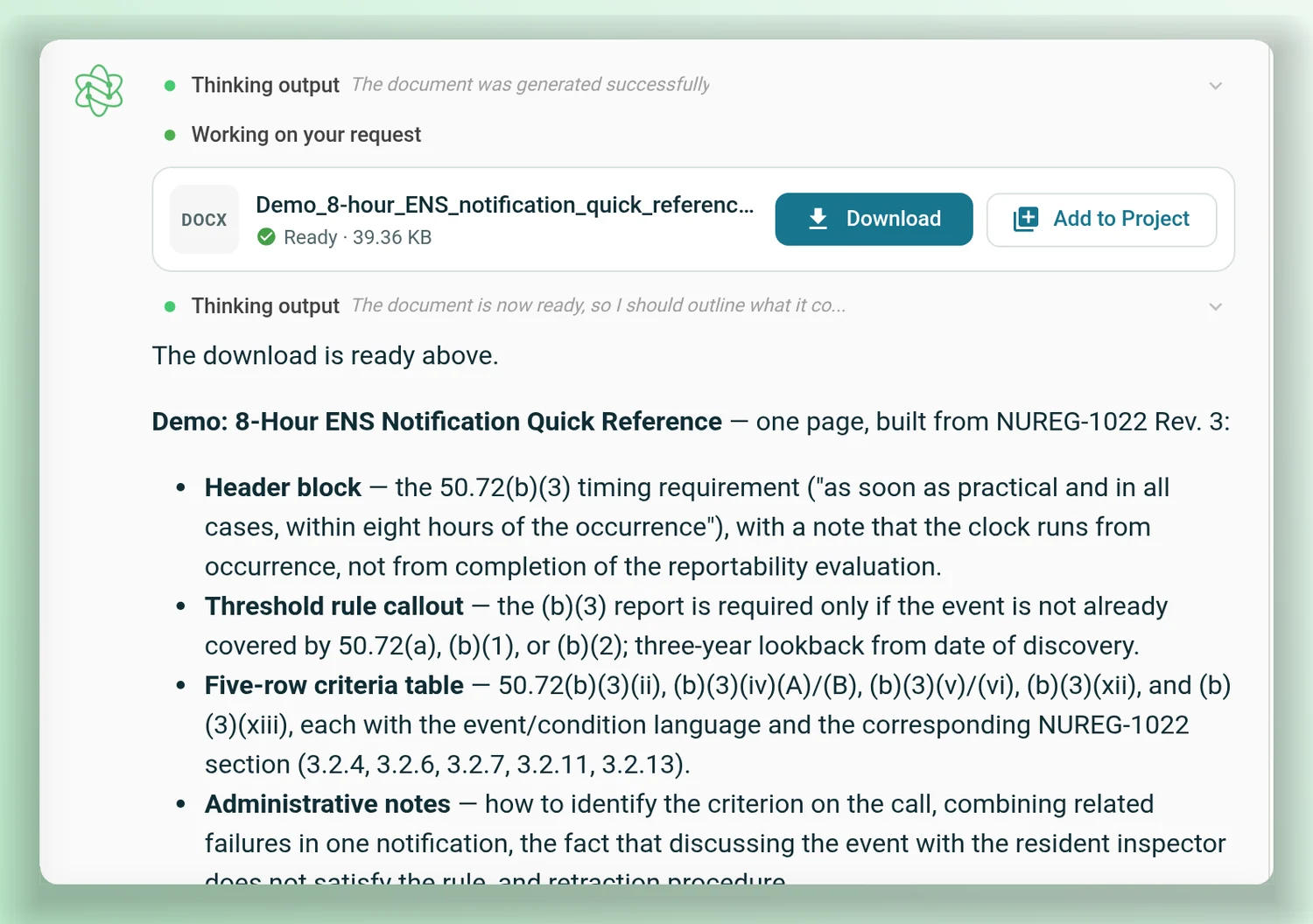
Turn the research into a Word document: evaluations, reports and letters, filled into your own template and ready to edit.
See drafting → Work planningPlan the job with its history
Find the procedure, the past work orders on that component and the operating experience before you write the package, and keep it all in one project.
See projects →Configured on AtomAssist for a plant's own program.
Two examples of workflows a plant can set up on AtomAssist's agents. Each page walks through the problem and the workflow; the examples are illustrative.
Boric acid evaluation
Move a boric acid finding into a cited evaluation draft, with the component's history gathered and the missing information named. Program and system engineering keeps the decision.
See the workflow → Illustrative · Operations, chemistry and RPLiquid waste routing
Check a liquid waste batch against the plant's limits before the crew chooses a route, with the constraints, citations and approvals in one advisory package. The licensed crew keeps the decision.
See the workflow →AtomAssist, with a specialist tool for each job.
Start in AtomAssist. Nuclearn's specialist tools each take one job further: Search is included, Regulatory AI works inside AtomAssist, Parts AI works with it, Simulator AI puts a plant simulator under its control, and the rest run on the same platform, with one sign-in and the same documents and permissions.
Nuclearn Search
An AI agent for your plant's documents and public NRC and DOE sources that reads the documents themselves and cites the page. It's the search AtomAssist answers with.
search.nuclearn.ai → The library AtomAssist answers fromNuclearn Document Library
Nuclearn Connect brings procedures, vendor manuals, drawings and licensing documents in from the document systems your plant uses, and OCR reads the scans. AtomAssist's citations open the page.
documents.nuclearn.ai →Nuclearn Regulatory AI
50.59 applicability, screening and the eight evaluation criteria against your UFSAR and tech specs, with a challenge agent questioning each answer. Its 50.59 Evaluation and regulatory agents sit in AtomAssist's sidebar.
regulatory.nuclearn.ai → Works with AtomAssistNuclearn Parts AI
Item equivalency evaluations for replacement parts, plus parts sourcing and catalog search. The evaluations run on AtomAssist's agents, and AtomAssist agents can search your parts catalog.
parts.nuclearn.ai →Nuclearn CAP AI
Write a complete condition report in plain words and screen it against your own codes and procedures, with the reasons shown. Raising a report from AtomAssist, and reporting on its screening results there, are switched on per deployment.
cap.nuclearn.ai → Performance improvementNuclearn Performance Improvement AI
Codes your condition reports against WANO performance objectives and criteria, shows which codes stand out by unit, department or quarter, and builds the trend report.
performance.nuclearn.ai → EngineeringNuclearn Engineering AI
Drafts review reports on your own Word template from an RFP, specification or requirements, with citations, and splits the work by discipline for you to approve.
engineering.nuclearn.ai → System and equipment engineersNuclearn Equipment AI
Scores each piece of equipment from sensor trends, work orders, condition reports and rounds, with the evidence behind the score. It puts AtomAssist agents to work on each location's alarms and history.
equipment.nuclearn.ai → Outage planners and schedulersNuclearn Work AI
Finds the logic ties that set your outage finish date, runs your P6 schedule thousands of times with durations from past outages, and tags work orders capital or expense.
work.nuclearn.ai → Operations and system engineersNuclearn Link for P&IDs
Turns the P&ID PDFs and scans you have into one connected plant. Included for AtomAssist users, and asking AtomAssist about your P&IDs is switched on per deployment.
link.nuclearn.ai →Agents for nuclear work, ready to run.
AtomAssist comes with workflows and agents that Nuclearn built for plant work. Pick one, describe the job, and it works through its steps and cites its sources.
50.59 Evaluation, Reportability Screener, ADAMS Researcher, NRC Reg Guide Navigator and the Nuclearn Research Agent are part of Regulatory AI, which works inside AtomAssist: licensed separately and switched on per deployment. The Document Reviewer comes with AtomAssist, and any agent can draft Word, Excel and PowerPoint files.
The answer exists. Finding it takes the day.
A plant's knowledge sits in procedures, the FSAR, tech specs, condition reports, work orders and decades of NRC correspondence, spread across systems that don't talk to each other. One question can mean four searches and a few hundred pages of reading.
Then it has to be written up: the screening, the evaluation, the trend report, the work package. The people who know where to look are usually the ones with the least time.
AtomAssist starts from the documents you already have.
INL's estimate of what those steps cost today: finding similar past work packages, the technical information for the equipment, engineering and tech spec changes, and the current revisions of procedures. At $200/hr.
INL's estimate of what work-package planning costs today, at $200/hr. It is over 42% of the cost of the whole work-management process, from screening to close-out.
INL's figures are its estimates of what this work costs now, not savings from AtomAssist. Its step times are expert estimates and vary by plant, and outage work is not included. Source at the foot of the page.
Working on your documents from day one
No new system of record and no migration project. Bring the documents in and start asking.
Bring your documents in
Upload documents and spreadsheets into datasets, or import them from the document management systems your plant already uses. Access is set per dataset, so each person searches only what they may see.
Ask, or pick an agent
Ask in plain language, or start one of your agents or workflows from the sidebar. AtomAssist can also pick the right agent for the question.
Check it and use it
Open any citation at its passage, export the sources, and take the draft into Word. Keep the work in a project your team shares.
Answers you can check in one click.
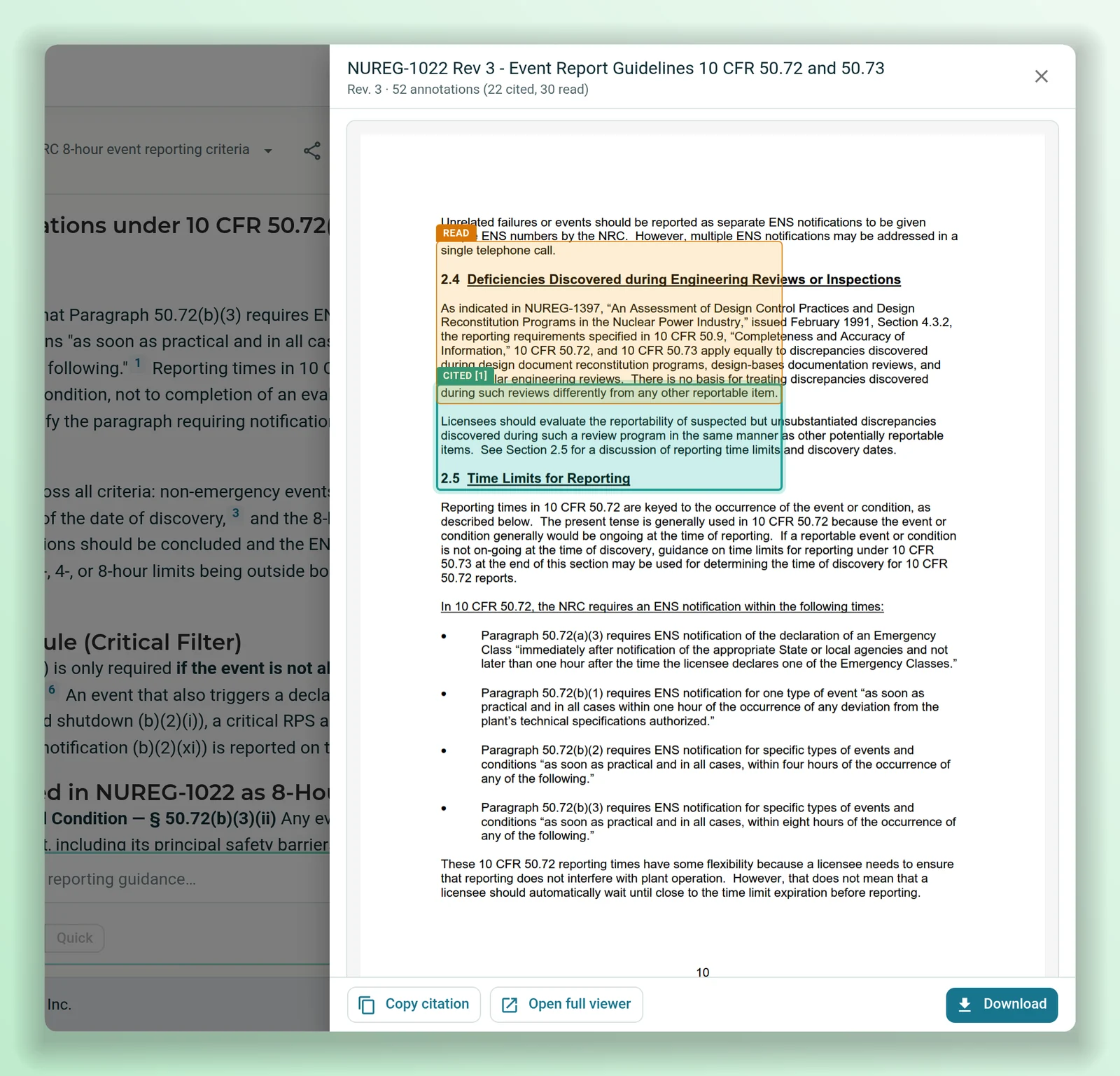
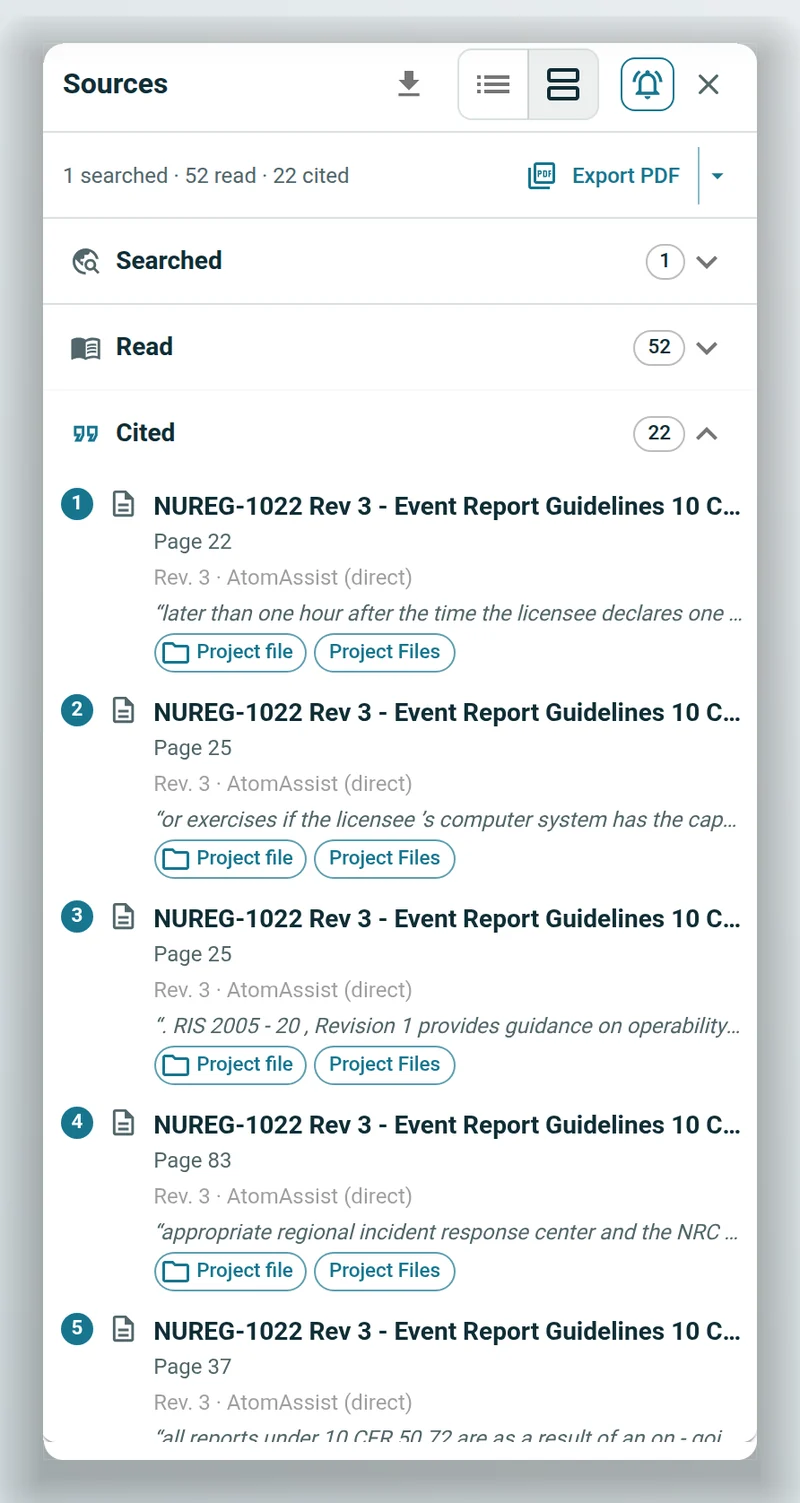
Every answer comes with numbered citations, and a line under it counts what was searched, read and cited. Open the Sources panel to see each document, or click a citation and the document opens with the passage highlighted.
- Citation numbers stay the same for the whole conversation.
- Export the sources as a PDF report, for one answer or the whole conversation, or save it to a project folder.
- Search covers only the datasets each person has access to.
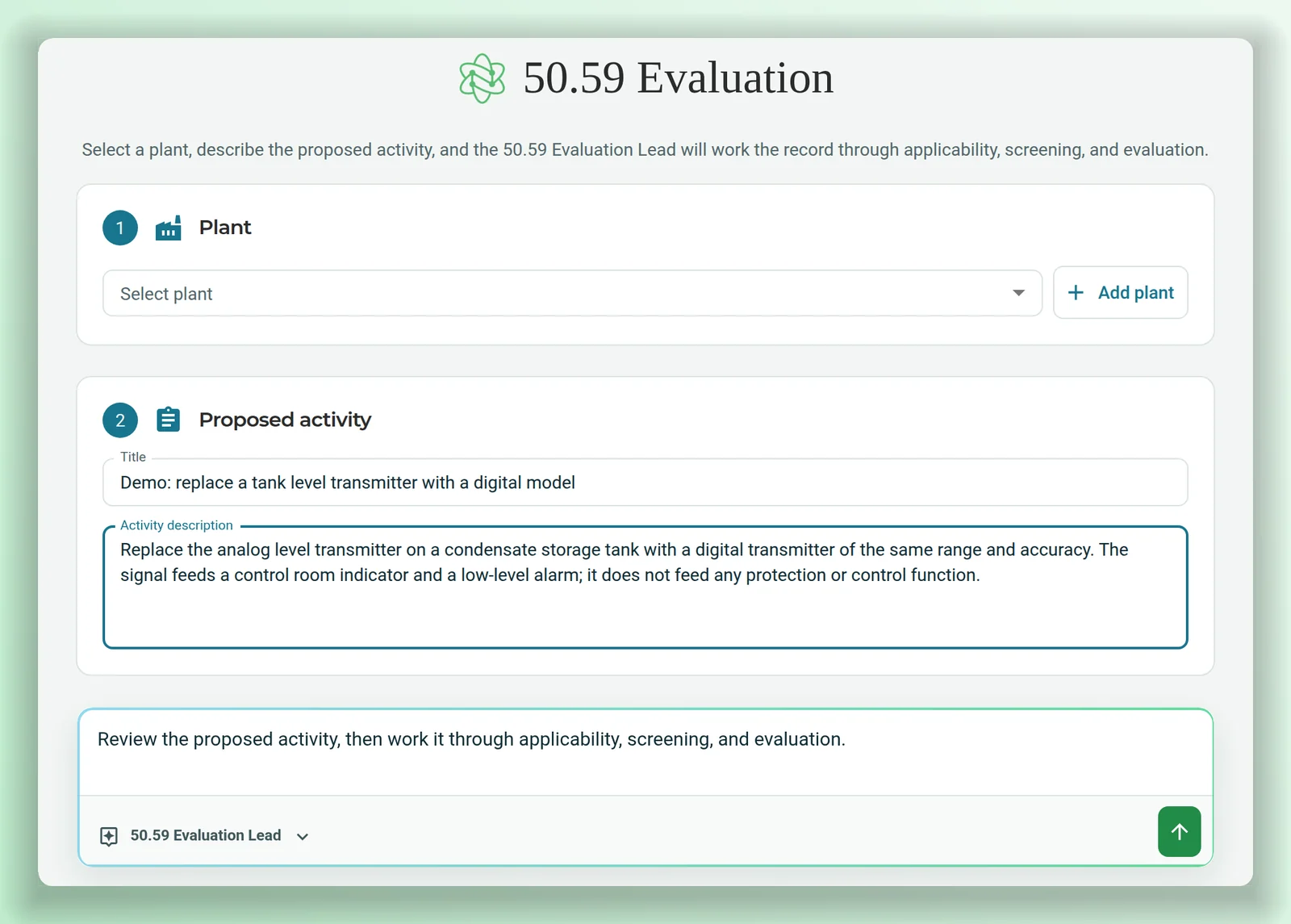
A 50.59, worked through step by step.
Describe the activity and the 50.59 workflow takes it through each stage against your plant's licensing basis: the UFSAR and tech specs, plus design basis, procedures and prior evaluations if you add them. Each answer is cited, and a separate agent challenges the work before the report is drafted.
The workflow assembles the basis and the draft. The licensing engineer reviews it and owns the disposition. Part of Regulatory AI.
An equivalency evaluation, one decision at a time.
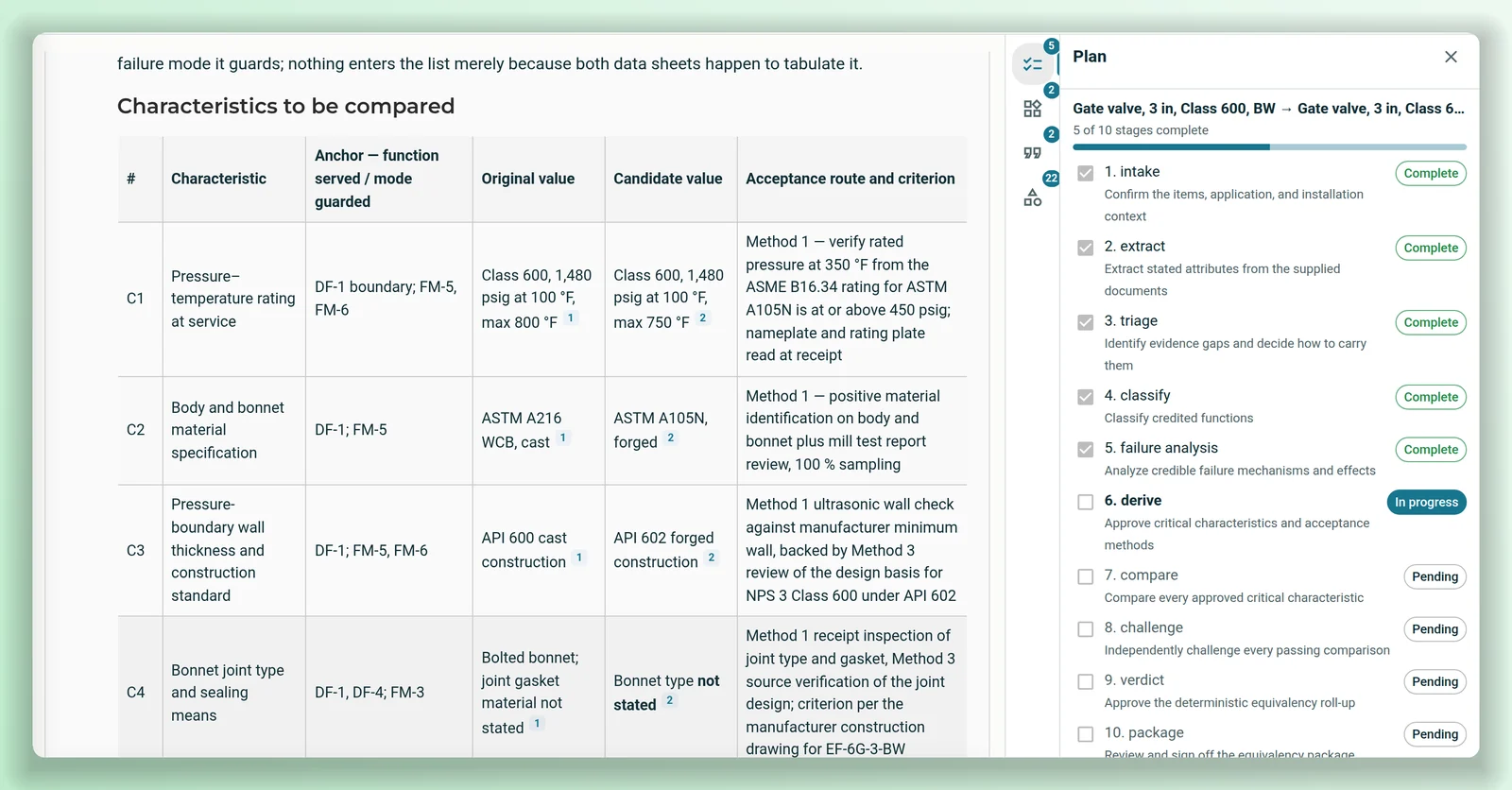
When a part goes obsolete, Parts AI's item equivalency evaluation runs on AtomAssist's agents. It pulls the stated values from both data sheets, names the function or failure mode each critical characteristic guards, compares them with citations, and stops for the procurement engineer at each decision.
- Ten stages from intake to the Word package; eight wait for an engineer's approval.
- A separate agent tries to refute every passing comparison before the verdict.
- Missing evidence stays visible, with the document that would close it.
The evaluation assembles the comparison and the package. The engineer owns the equivalency decision. Part of Parts AI.
Hand the legwork to agents.
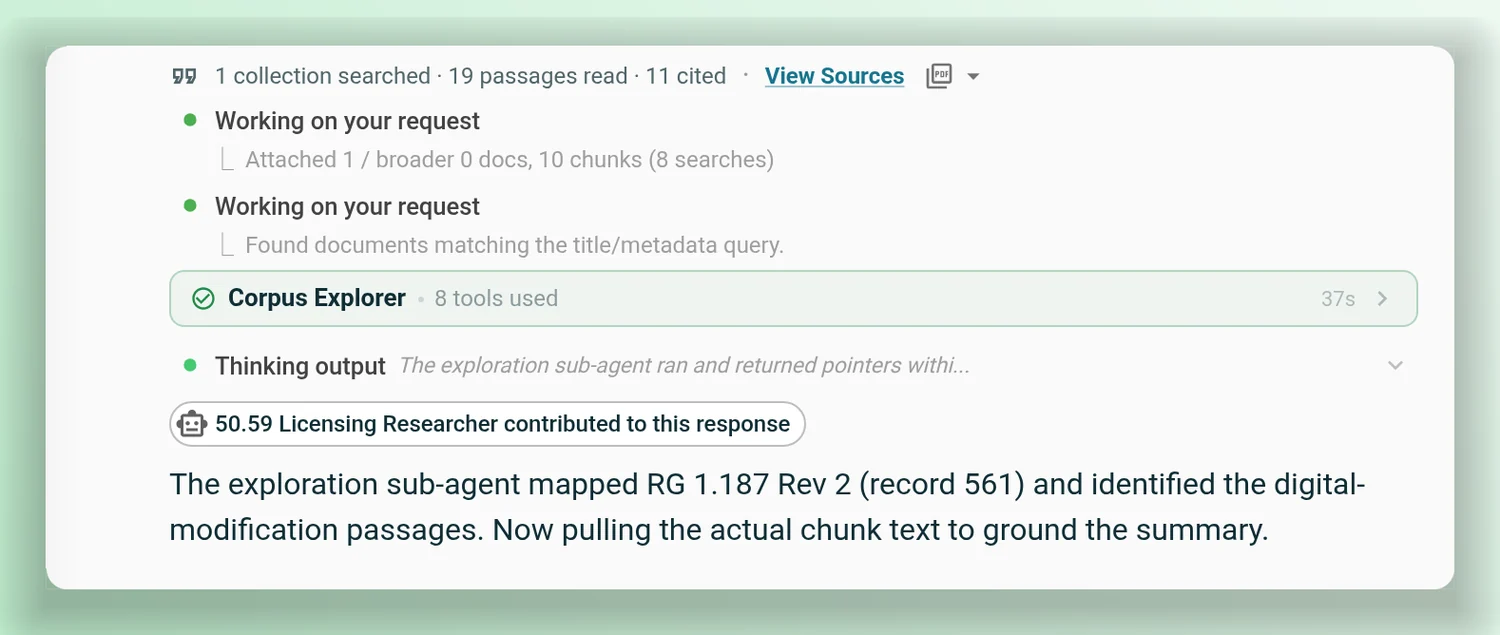
Big questions get split up. AtomAssist hands focused searches to specialist sub-agents, which report back what they found, then puts the answer together. Your plant's agents and workflows sit in the sidebar, one click away.
- Each agent gets only the tools and documents it was given.
- Every step shows in the conversation: what was searched, read and found.
- Describe the agent you want and AtomAssist drafts its setup, or build it by hand. Share it with your team.
- Save a plan that worked as a template in the project, for the next person.
In use today: a Nuclearn customer drafts barrier-evaluation packages with a three-agent workflow. A multi-week task became a multi-day deliverable, and a person reviews each package and makes the call.
Keep a body of work together.
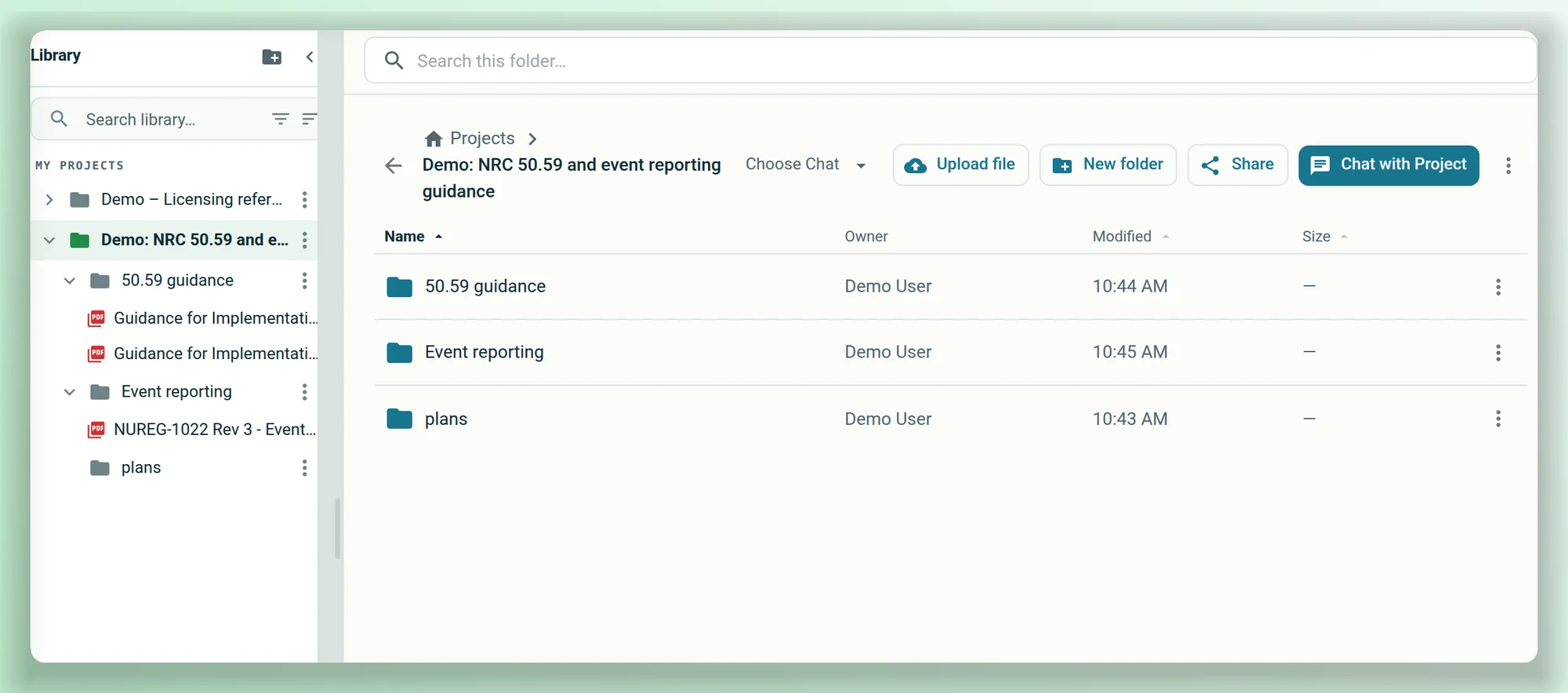
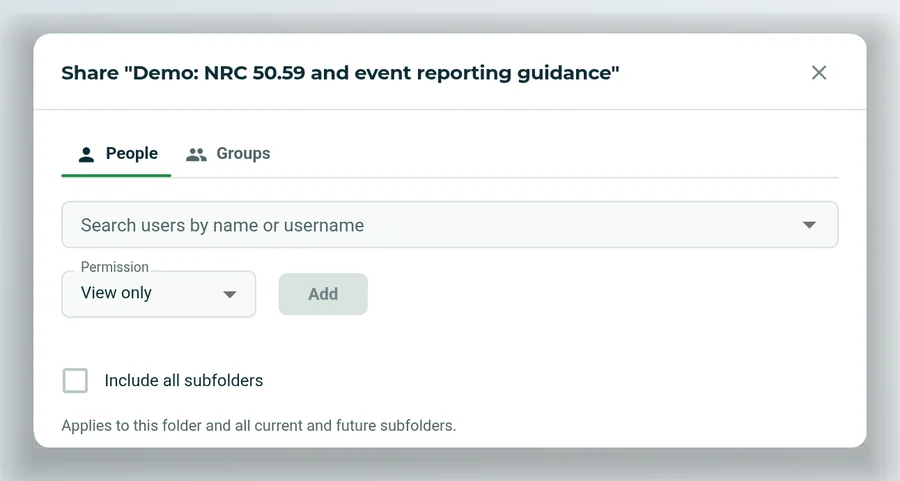
A project holds the files, folders and conversations for one job: a modification, an outage scope, a licensing submittal. Chat with the project and AtomAssist answers from its files. Share it with people or groups, and the sharing carries down into its folders.
- Open PDFs, images, spreadsheets and text right in the project.
- Give each person or group view, edit or manage rights.
- Save source reports and plans back into the project folders.
From research to a Word document.
When the research is done, AtomAssist writes it up as a document you can download and edit. Upload your own Word template and it fills in the fields, so the draft arrives in the format your reviewers expect. A reviewer agent can check the draft against a rubric first.
- Word, Excel and PowerPoint files and charts, built in a sandbox with no network access.
- Templates are your own Word files, with placeholders for the agent to fill.
- Documents can be compared, with the differences listed.
Recurring work, on a schedule.
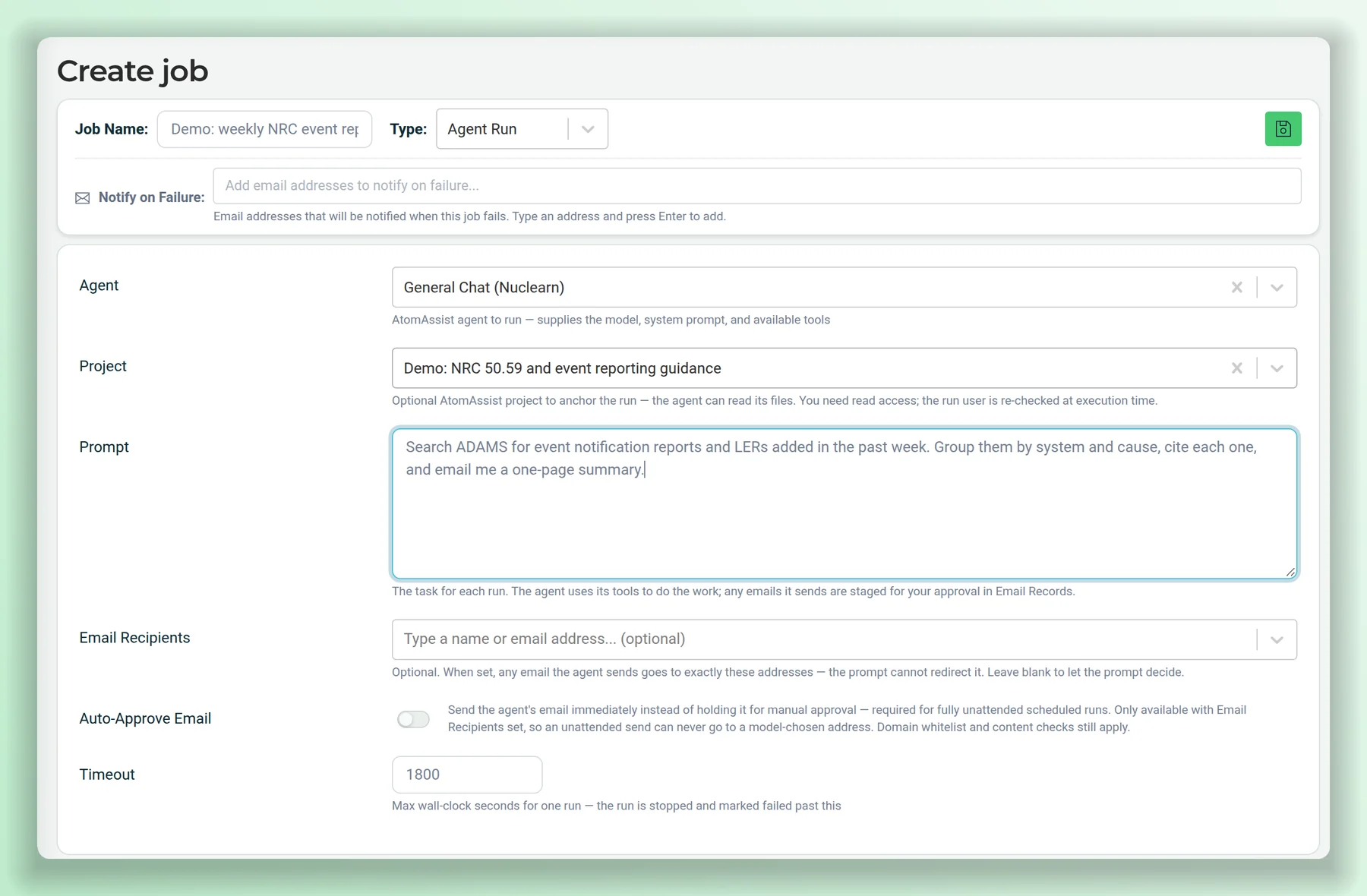
Put an agent on a schedule: a weekly condition-report trend summary, a daily look at new NRC documents, a monthly status report. Each run starts from the same prompt and project and emails the result.
- Administrators set up scheduled runs and choose who receives them.
- Emails wait for approval unless the recipients are fixed in advance.
- Each run is listed with its status, and its conversation is kept.
Agents that use the right tools.
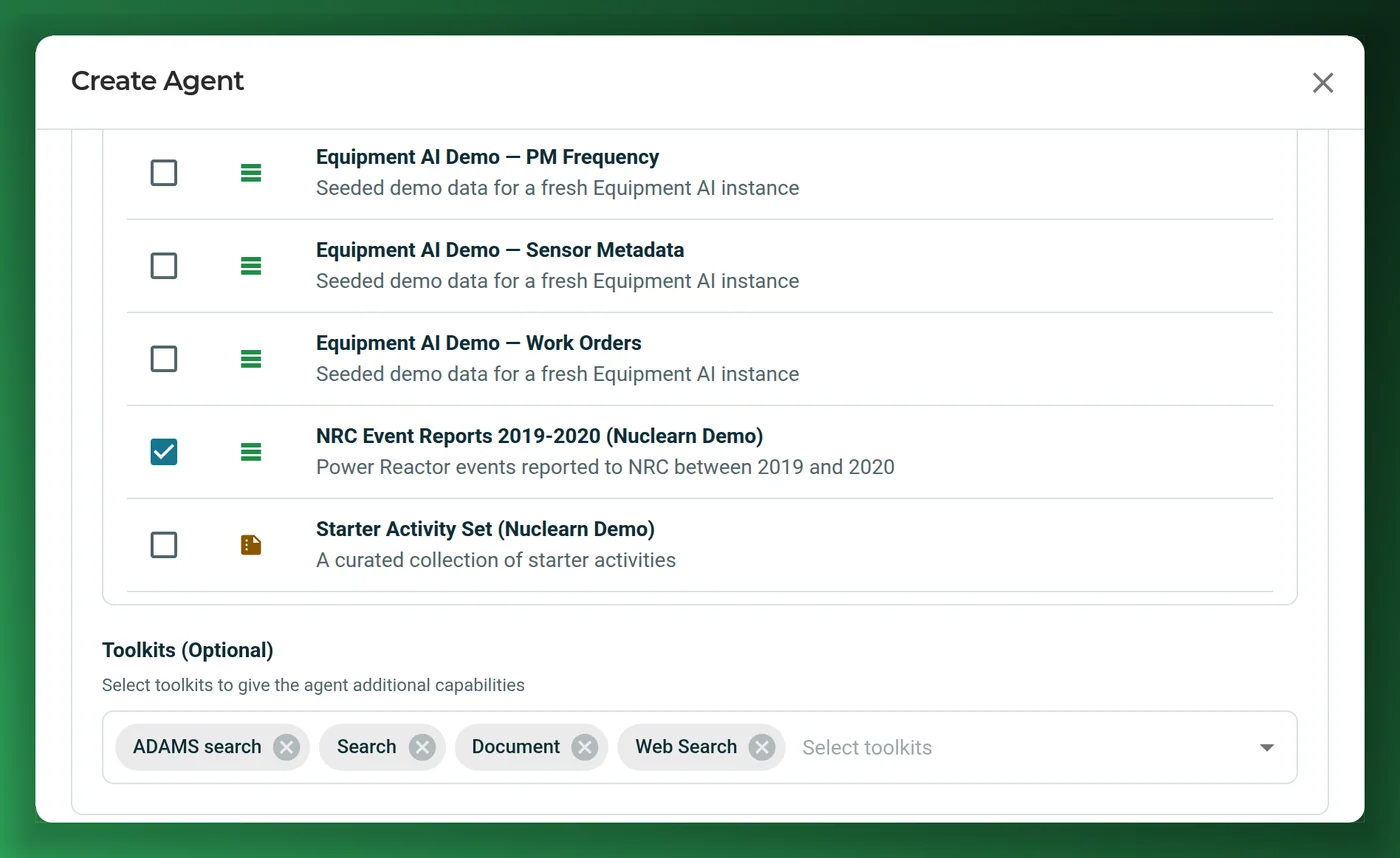
AtomAssist agents work through tools, and each agent is given its tools on purpose: search your datasets, read and compare documents, query tables, search NRC ADAMS, run code in a sandbox, and draft email for approval. An agent without a tool can't use it.
Find DocumentsNuclearn SearchNuclearn ShellFrom a real conversation over public NRC documents, shortened.
Switched on per deployment: other apps' tools over MCP, including Nuclearn Link for P&IDs, so agents can follow lines across drawings and pull isolation boundaries in the same conversation. Link is included for AtomAssist users.
Made for the documents and habits plants actually have
Drawings, photos and scans in the chat
Paste or upload an image, such as a drawing detail, a field photo or a scanned page, and ask about it.
Spreadsheets, too
Condition reports and work orders as tables, queried and charted in the conversation.
Quick or thorough
A quick answer for a quick question, or a thorough pass when it matters.
Asks when it needs you
An agent can stop to ask you to choose, confirm or upload a file, then carry on.
Set up once, used by all
An expert builds an agent once, and the whole team gets the same method without writing the perfect prompt.
Your people, groups and roles
Datasets, folders and projects are shared with people and groups, and platform roles decide who can build agents, add data and schedule runs.
In Nuclearn's datacenter. Scoped to each person.
AtomAssist runs in Nuclearn's own datacenter, on Nuclearn's hardware, and every search, agent and tool works within the signed-in person's access.
Single-tenant, hosted by Nuclearn
Each plant gets its own instance, hosted by Nuclearn in our own datacenter on our own hardware. Azure Government or your own servers on request.
Built for 10 CFR Part 810
How AtomAssist is hosted, operated and supported is set up for 10 CFR Part 810 export controls.
Your single sign-on
People sign in through your identity provider, such as Microsoft Entra ID, Okta or Ping, or with Active Directory. Groups can map to platform roles.
Access per dataset and folder
Rights are set per dataset, folder and project, for people and groups, and search and agents respect them.
Agents limited by design
An agent can only use the tools and documents it was given. Emails wait for approval, web searches show you the query first, and internet access is off until an administrator turns it on.
A record of every run
Each conversation keeps its tool calls and sources, so you can see how an answer was reached and export it.
A certified company
Nuclearn is ISO/IEC 27001:2022 certified. Products are licensed and switched on per site; unlicensed ones don't load.
What it is not
AtomAssist is not a system of record, and it doesn't make licensing, operability or work decisions. It finds the basis and drafts the work, with its sources, for the plant's qualified people to decide on.
Questions plants ask first
How is this different from a general AI chat tool?
AtomAssist answers from your plant's own documents, within each person's access, and shows its sources. Its agents use only the tools and documents they were given. It runs in Nuclearn's own datacenter, and it comes with workflows built for nuclear work, such as 50.59.
Does it replace Copilot or ChatGPT?
No. Keep them for general work. Use AtomAssist for your plant's own documents, with the sources shown, and for nuclear workflows such as 50.59, on a single-tenant instance hosted by Nuclearn.
Can we trust the answers?
Check them, the way you'd check a colleague's work: every answer lists what it searched, read and cited, and each citation opens at its passage. AtomAssist drafts and researches; it doesn't replace the qualified person who signs off.
Which documents can it use?
PDFs, Word, Excel, PowerPoint, CSV, text and HTML files, and tables of records such as condition reports and work orders. You can also paste or upload images into a conversation. Documents can be uploaded into datasets or imported from the document management systems your plant already uses.
Who can see what?
Access is set per dataset, folder and project, for people and groups. Search and agents work within the access of the person using them, so two people can ask the same question and get answers from different documents.
Which Nuclearn products work inside AtomAssist?
Nuclearn Search is included with AtomAssist. Regulatory AI works inside AtomAssist: its 50.59 Evaluation and regulatory agents sit in AtomAssist's sidebar. Parts AI works with AtomAssist: its equivalency evaluations run on AtomAssist's agents. The other products run on the same platform as AtomAssist, with the same sign-in, documents and permissions.
Do we need AtomAssist to use another Nuclearn product?
No. Each product runs on its own on the Nuclearn platform. With AtomAssist as well, the plant's AI works over the same documents, sign-in and permissions.
Where does it run?
Each plant runs in its own single-tenant instance, hosted by Nuclearn in our own datacenter on our own hardware, with hosting, operations and support set up for 10 CFR Part 810 export controls. Azure Government or your own servers on request. People sign in through your company's single sign-on.
Does it reach the internet?
Only if an administrator turns internet access on. Even then, web searches show you the exact query to approve or edit before it's sent, and emails wait for approval. Code runs in a sandbox with no network access.
See an answer traced to its source.
We'll show AtomAssist answering from public NRC documents with its sources, agents working through a licensing question, a shared project and a drafted report, and how the specialist tools fit your teams. We'll also answer your IT team's questions about deployment and sign-in.
- A live walkthrough on publicly available NRC documents
- Your questions on deployment, sign-in and data
- Which of your teams' jobs it would help with first
AtomAssist is backed by Nuclearn, whose products serve over 70 facilities in North America
Book a demo
Tell us a little about your site and we'll set up a time.
Thanks, we've got it.
We'll be in touch to set up a time. If it's urgent, email contact@nuclearn.ai.
Rather choose a time yourself? See open times on the calendar →
Prefer email? contact@nuclearn.ai